What Is a Job Scheduling System for Home Service Businesses?
# What Is a Job Scheduling System for Home Service Businesses?
A job scheduling system is software that books, dispatches, and tracks every job your crew runs, replacing the whiteboard, the sticky notes, and the dispatcher's memory with one live view of who's where and what's next. For a plumber, HVAC contractor, electrician, or roofer, that translates into faster dispatch, higher technician utilization, and fewer missed appointments that cost you five-star reviews.
Here's what changes once one of these systems is running your day:
- —Dispatchers assign jobs by dragging a ticket onto a technician's slot instead of making three phone calls
- —Customers get automatic texts confirming appointments and tracking their technician's ETA
- —Technicians see their full day on a phone app, even with no signal on a job site
- —Owners get paid faster because invoicing happens on-site, not three days later at a desk
This guide walks through how these systems actually work day to day, what kind of return you can expect, how to test one before you commit, and how to roll it out without blowing up a week of bookings.
Key Takeaways
A job scheduling system works because it replaces manual dispatch decisions with automated matching, real-time updates, and unified intake, cutting assignment time to under 90 seconds while lifting technician throughput.
| Point | Details |
|---|---|
| Start with the core four | Validate scheduling and dispatch, quoting and invoicing, client management, and mobile access before anything else. |
| Test real-time sync | A job created on desktop should reach a technician's phone in under 30 seconds during any trial. |
| Automate assignment early | Technician assignment automation delivers the largest efficiency gains of the five implementation layers. |
| Match tools to crew size | A 2-person shop and a 10-truck operation need different feature priorities and pricing tiers. |
| Pair software with lead flow | Vaultio's SEO and AI lead response fill the calendar that your new scheduling system then organizes and dispatches. |
Table of Contents
- —How a Job Scheduling System Works Day to Day
- —Measurable Benefits Contractors Can Expect
- —How to Evaluate a System Before You Commit
- —Rolling Out a Scheduling System Without Disrupting Your Week
- —Cloud-Based vs. On-Premise Scheduling Systems
- —Beyond Scheduling: Resource Allocation and Job Prioritization
- —Which Trades Use Job Scheduling Systems Most
- —Comparing Job Scheduling Software by Business Size
- —Security and Data Privacy in Scheduling Software
- —Common Challenges and Limitations to Expect
- —What Actually Matters When You're Choosing One
- —Why Vaultio Complements Your Scheduling Software
- —Sources
How a Job Scheduling System Works Day to Day
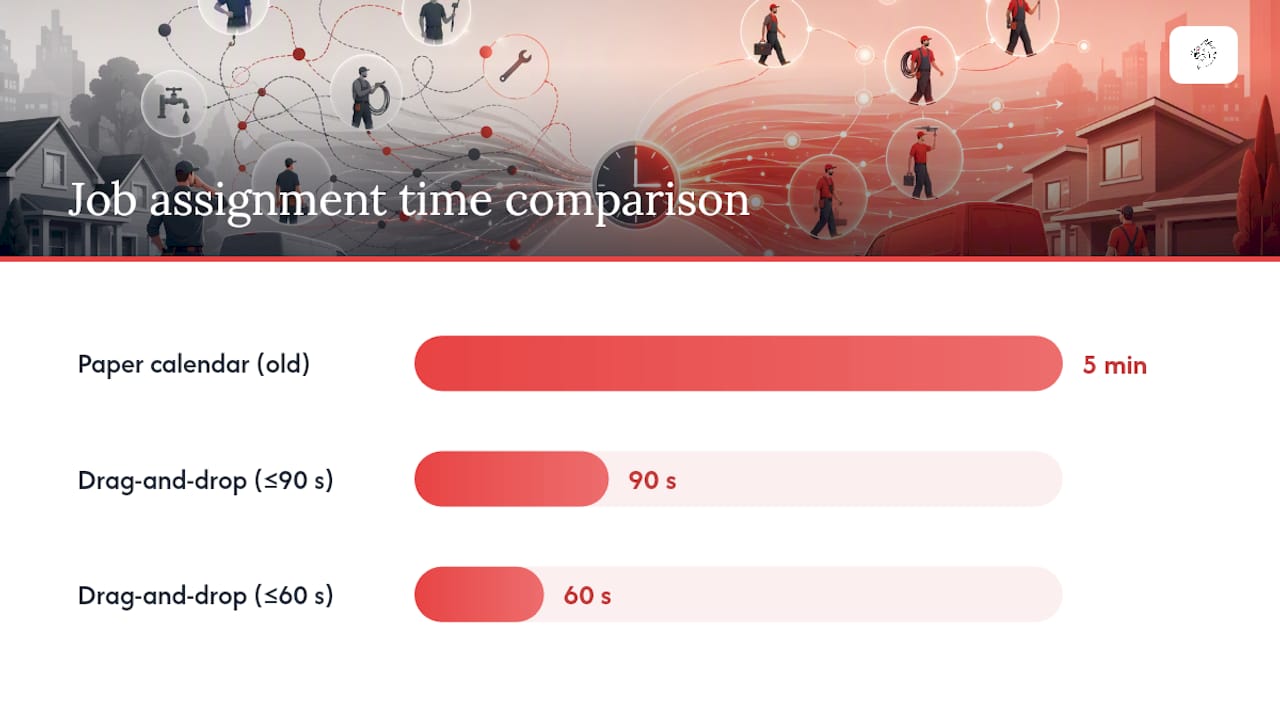
The heart of any job scheduling system is the dispatch board, and once you've used a drag-and-drop version, going back to a paper calendar feels like steering a truck with a rope. Best-in-class platforms let a dispatcher pick up an unassigned job and drop it onto an available technician's slot, matching skill and location in under 60 to 90 seconds, a task that used to eat five minutes of phone tag per job.
The GPS dispatch map sits next to that board and shows every truck in real time, so a dispatcher can hand a same-day emergency call to whoever's actually closest instead of whoever picked up the phone first.
Here's what the rest of the stack handles:
- 1.Booking portal and intake queue. Calls, web forms, and chat messages land in one queue instead of three separate inboxes, so nothing falls through the cracks between a missed call and a Facebook message.
- 2.Mobile technician app. Techs get their schedule, customer history, and job notes on their phone, with offline access that keeps working in a basement or a rural service area with no signal.
- 3.On-site workflows. Digital work orders, photo capture for before/after documentation, built-in timers for labor tracking, and invoicing that happens before the truck leaves the driveway.
- 4.Automated customer notifications. Confirmation texts, day-before reminders, and live ETA updates cut down the "where's my technician" calls that eat a dispatcher's morning.
- 5.Route optimization. Traffic-aware sequencing reorders a technician's stops automatically when a job runs long or a road closes.
- 6.Integrations. Payments and QuickBooks sync mean a completed job flows straight into your books without someone retyping it that night.
Pro Tip: Watch how fast a system's mobile app reflects a change made on the office computer. If a dispatcher moves a job and the technician's phone doesn't update within half a minute, that lag will show up as a truck sitting at the wrong address.
Measurable Benefits Contractors Can Expect
The numbers here aren't theoretical. Contractors switching from phone-based dispatch to a modern scheduling platform report meaningful jumps in technician throughput within the first 90 days.
One vendor case cited technicians completing 35% more jobs per day after adoption, alongside dispatcher status calls dropping by more than 80% during that same early window.
That second number matters more than it sounds. Every call a dispatcher takes to say "he's running 20 minutes late" is a call they're not spending booking the next job. Automated ETA texts absorb that entire category of interruption.
Beyond throughput, contractors typically see these shifts:
- —Higher booking conversion once a self-service online scheduling portal is live, because customers book on their own time instead of waiting for a callback
- —Fewer no-shows once automated reminders replace a dispatcher's memory
- —Faster invoicing and better cash collection when techs bill on-site instead of mailing paper
- —Cleaner data feeding into your sales pipeline for repeat business and maintenance contracts
None of this happens the day you flip the switch. Solo operators tend to see the basics working within days, while mid-size shops benefit from a staged rollout over one to three months as the team adjusts.
How to Evaluate a System Before You Commit
Every vendor demo looks impressive. What matters is whether the platform survives contact with your actual Tuesday. At minimum, field service software must handle scheduling and dispatch, quoting and invoicing, client management, and mobile access before you even look at extras like route optimization.
Run these four tests during any trial:
- —Real-time sync test. Create a job on the desktop and time how long it takes to appear on a technician's phone. Anything under 30 seconds counts as real-time; a system that polls every 15 minutes or needs a manual refresh will cause missed jobs.
- —Offline mobile test. Put the phone in airplane mode and confirm a technician can still see their schedule and log job details.
- —Quote-from-phone test. Time how long it takes a technician to build and send a quote from a customer's driveway.
- —Emergency assignment test. Simulate an urgent same-day call and see how many steps it takes to find the nearest available tech and push the job to their phone.
Scale changes what you should prioritize:
| Shop Size | Must-Have Focus | Nice-to-Have |
|---|---|---|
| 1 to 5 techs | Scheduling, invoicing, mobile access | Route optimization |
| 6 to 10 techs | Two-way SMS, QuickBooks sync, reporting | Membership/maintenance plans |
| 10+ techs | Real-time GPS dispatch, pricebook management, multi-crew views | Custom API integrations |
Watch for vendors who dodge questions about offline functionality, on-site payment processing, or QuickBooks sync. Pricing structure is a tell too: expect starter plans in the $39 to $79 monthly range for small shops, while quote-only pricing usually signals a longer, more expensive implementation built for larger specialized trades.
Rolling Out a Scheduling System Without Disrupting Your Week
A full implementation covers five layers: intake, booking confirmation, technician assignment, day-of dispatch, and post-job follow-up, and contractors who build all five see compounding returns instead of a single one-time bump.
Here's a sequence that keeps your current bookings safe while you switch:
- 1.Unify intake first. Route calls, web forms, and chat into one queue before you touch anything else. This is the foundation every downstream automation depends on.
- 2.Import data and build your pricebook. Load customer history, service history, and pricing so quotes go out consistent from day one.
- 3.Automate booking confirmations. Turn on the confirmation text sequence, since simple confirmation automations pay off almost immediately with minimal training required.
- 4.Pick a pilot area. Run one crew or one service line on the new system for a week or two before touching the rest of the team.
- 5.Train on assignment and dispatch. This layer takes the most adjustment but delivers the largest efficiency gains once dispatchers trust the drag-and-drop board over the phone.
- 6.Add post-job follow-up. Automated review requests and maintenance reminders close the loop and feed your after-hours lead capture strategy.
Pro Tip: Keep your old whiteboard or spreadsheet running in parallel for the first week of your pilot. It's a five-minute insurance policy against losing a booking while your dispatcher learns the new board.
Expect a pilot to take one to two weeks. Full-team rollout runs four to twelve weeks depending on crew size and how many integrations you're layering in.
Cloud-Based vs. On-Premise Scheduling Systems
Most contractors today run cloud-based systems, and for good reason: a browser and a phone app are all a dispatcher needs, updates happen automatically, and a technician working a job three towns over can still see live data. On-premise systems, hosted on a server you own and maintain, still exist mostly in larger operations with dedicated IT staff and specific compliance requirements that demand data stay on local hardware.
For a plumbing, HVAC, electrical, or roofing business running under 50 trucks, cloud-based almost always wins on cost and flexibility. You're not paying for server maintenance, and your dispatcher can work from home during a snow day without missing a beat. On-premise systems tend to show up in specialized trades or enterprise field service operations where quote-only software and dedicated implementation teams are the norm anyway.
The tradeoff worth knowing: cloud systems depend on internet connectivity for the office side, though the better ones solve this with offline-capable mobile apps for technicians in the field. On-premise systems avoid that dependency but shift the maintenance burden, security patching, and backup responsibility onto you or a hired IT contractor. For most independent contractors and small shops, that tradeoff isn't close. The upfront cost and staffing an on-premise setup demands rarely pencils out against a cloud subscription that scales with your crew size.
Beyond Scheduling: Resource Allocation and Job Prioritization
Scheduling gets the headline, but the features working underneath it are what keep a growing shop from becoming chaos. Resource allocation means the system knows which technician has the right certification for a gas line repair versus a routine tune-up, and it won't let a dispatcher accidentally send an apprentice to a job that needs a licensed electrician.
Job prioritization sorts incoming work by urgency automatically. A no-heat call in January should never sit in the same queue as a routine filter change, and a good system flags emergency work so it jumps ahead without a dispatcher manually reordering the whole day.
Inventory and equipment tracking round out the picture for trades that stock parts on the truck. Knowing which truck is carrying the right-size water heater before you dispatch it saves a wasted trip back to the warehouse. Skills-based matching works the same way: a system that tags technicians by certification, specialty, or even language spoken can auto-suggest the best match for a job instead of leaving that judgment call to whoever's free.
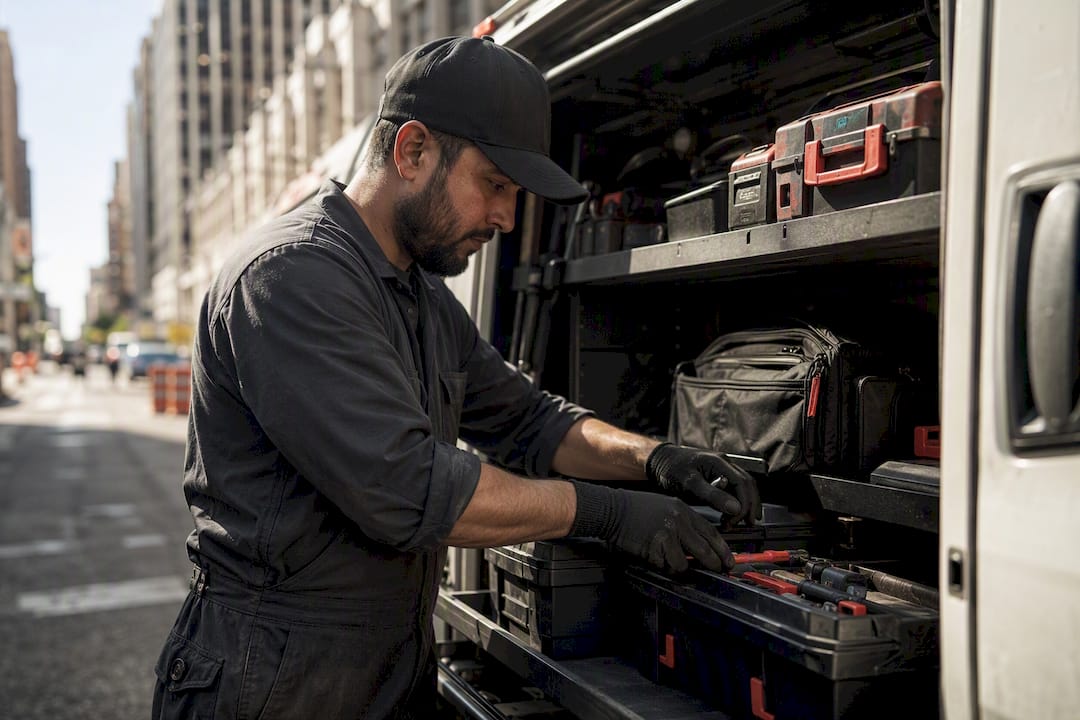
Together, these features turn a scheduling tool into something closer to an operations command center. They're also usually what separates entry-level tools from platforms built for shops running ten or more trucks, since the payoff scales with crew size.
Which Trades Use Job Scheduling Systems Most
Plumbing, HVAC, electrical, roofing, and residential cleaning make up the core user base for these platforms, and the reason is simple: all five trades run a high volume of appointment-based work with variable job length and constant last-minute changes. Landscaping and pest control follow close behind, particularly for businesses running recurring maintenance contracts that need automated rebooking.
HVAC contractors lean especially hard on route optimization and emergency dispatch, since a no-heat or no-AC call in extreme weather can't wait for the next available slot. A look at real HVAC automation deployments shows how automated scheduling directly reduces the time between a customer's call and a technician arriving on a peak-demand day, which is exactly when a homeowner is deciding whether to call you again next season.
Cleaning and landscaping businesses use these systems differently, leaning more heavily on recurring appointment automation since so much of their revenue comes from standing weekly or biweekly visits rather than one-off emergency calls. Electricians and roofers sit in between, mixing scheduled work with a steady trickle of urgent service calls that need the same fast-dispatch tools HVAC companies rely on.
Comparing Job Scheduling Software by Business Size
No single platform fits every shop, and the honest answer to "which one should I buy" depends entirely on how many trucks you're running and how complex your service mix is. Solo operators and two- or three-tech shops generally do fine with entry-level tools built around simple scheduling, invoicing, and basic mobile access.
Mid-size shops running five to ten technicians need more: two-way SMS, QuickBooks sync, and solid reporting become non-negotiable at this size because a dispatcher can no longer track every job by memory. Larger operations and specialized trades often move toward platforms with quote-only pricing and dedicated implementation support, reflecting the complexity of managing dozens of trucks, multiple crews, and custom integrations.
Rather than treating this as a head-to-head vendor matchup, run the evaluation checklist from earlier in this guide against any platform you're considering, weighted for your actual crew size. A ten-truck HVAC company and a two-person plumbing outfit have almost nothing in common in terms of what "essential" means, and buying based on a friend's recommendation from a shop twice your size is one of the most common expensive mistakes contractors make.
Security and Data Privacy in Scheduling Software
Your scheduling system holds customer addresses, payment details, service history, and often garage codes or gate entry information, which makes it a meaningful data privacy responsibility, not just a productivity tool. Cloud platforms should encrypt data both in transit and at rest, and any system processing card payments needs PCI DSS compliance for that payment flow specifically.
Ask a vendor directly how customer payment data is handled during the on-site invoicing step, since that's where a weak integration can create real liability. Look for role-based access controls too, so a new hire can see their own schedule without pulling up every customer's full service and payment history across the company.
Data export matters more than most contractors realize until they need it. If you ever switch platforms, you need your customer history, service records, and financial data to come with you in a usable format, not locked behind a vendor that makes leaving painful. Confirm this before you sign, not after a contract renewal surprises you.
Common Challenges and Limitations to Expect
No scheduling system solves every problem on day one, and setting realistic expectations up front avoids a lot of frustration mid-rollout. The biggest limitation is adoption resistance: technicians who've dispatched off a paper list for fifteen years don't automatically trust a phone app, and that resistance can stall a rollout faster than any technical issue.
Data migration is the second common snag. Moving years of customer history, pricing, and job notes into a new system takes real time, and rushing it means you'll spend the first month fixing bad records instead of booking jobs. Connectivity gaps still trip up rural service areas too. Even the best offline mobile app can only sync once a technician gets signal again, which means a dispatcher needs a manual fallback plan for genuinely dead zones.
Cost creep is worth watching closely. A platform that looks affordable at five technicians can jump in price tier once you cross ten, and some vendors charge extra for features that felt included during the sales demo. Finally, no software fixes a dispatch process that was already broken. A system built around drag-and-drop assignment and GPS routing still needs a dispatcher who understands your service area and crew strengths. The tool speeds up good decisions; it doesn't make them for you.
What Actually Matters When You're Choosing One
Most advice on this topic treats every feature as equally important, and that's where contractors waste money. The truth is that intake unification and technician assignment automation carry almost all the operational weight. Route optimization and fancy reporting dashboards are nice, but they're polish on top of a foundation that either works or doesn't.
The conventional wisdom to "get the most feature-rich platform you can afford" also falls short. A ten-truck HVAC company and a three-person plumbing outfit need fundamentally different tools, and buying above your crew size just means paying for complexity you'll never configure correctly. Start with the four core functions: scheduling, invoicing, client management, and mobile access. Everything else is a should-have, not a must-have, until you've outgrown the basics.
If there's one thing the data supports clearly, it's this: the shops that see the fastest returns are the ones that automate technician assignment early, not last. That's the layer with the biggest efficiency gain, and too many owners save it for phase three when it should be phase one.
— Damian
Why Vaultio Complements Your Scheduling Software
A scheduling system only pays off if the phone is ringing in the first place. Vaultio is the piece that fills your calendar before dispatch even matters: SEO rankings that put your business at the top of Google and AI search, paired with AI-driven lead response that engages a new inquiry within seconds instead of hours.

Contractors using Vaultio's approach report a steady flow of 10 to 15 extra booked jobs every month, feeding directly into whatever scheduling and dispatch system you're running. Engaging with Vaultio typically starts with a quick audit of your current lead flow, followed by setup of automated response systems and booking capture that hand qualified jobs straight to your dispatch board. If you're running crews out of the Central Coast, check what a Santa Maria SEO strategy could add to your booked-job count this month, or explore how Local Service Ads can start feeding your new scheduling system with pay-per-lead work right away.
Sources
- —Field Scheduling Software: Drag-and-Drop Dispatch Board for Field Teams 2026 | FieldZenPro
- —Home Service Scheduling Automation Checklist 2026 | US Tech Automations
- —FSM Software Buyer's Guide 2026 - What to Look For
Recommended
Ready to Implement This?
We'll build your complete lead generation system in 72 hours. No contracts. 30-day money-back guarantee.