7 Steps to Fix Local Business Schema for Contractors With a Single @id

# 7 Steps to Fix Local Business Schema for Contractors With a Single @id
LocalBusiness schema is JSON-LD code that tells Google and AI search engines the exact facts about your business, name, address, phone, hours, so they can verify and display them correctly. The single highest-leverage move is adding a homepage LocalBusiness block that exactly matches your Google Business Profile, then confirming it works with Google's Rich Results Test.
*
TL;DR: - Accurate implementation of specific LocalBusiness subtypes, such as Plumber or HVACBusiness, unlocks additional properties that improve entity clarity for search engines. - For multi-location businesses, each location must have its own schema block with a unique `@id` and dedicated webpage to prevent entity confusion and ensure proper indexing. - Schema code should match the business's Google Business Profile and visible website content exactly to avoid trust issues and schema errors. - Use `areaServed` property with care for service-area businesses instead of fake addresses, as Google penalizes false location details. - Consistent validation with Google's Rich Results Test and ongoing monitoring in Search Console are essential to maintain schema accuracy and prevent performance declines.
*
Table of Contents
- —What Is LocalBusiness Schema and When Do You Need It?
- —Key LocalBusiness Properties and What Each One Does
- —How to Implement LocalBusiness Schema on Your Site
- —Multi-Location and Service-Area Patterns That Scale
- —Validation, Common Errors, and How to Fix Them
- —Implementation Checklist: The Exact Rollout Order
- —Why Entity Clarity Matters More Than Most Contractors Realize
- —Should You DIY Your Schema or Hire It Out?
- —Vaultio Handles the Schema Work So You Don't Have To
- —Where to Verify This Yourself
- —Sources
- —FAQ
What Is LocalBusiness Schema and When Do You Need It?
LocalBusiness schema is the vocabulary Schema built specifically to describe a physical business or branch location in a format machines can parse without guessing. Instead of Google scraping your "Contact Us" page and hoping it interprets your address correctly, you hand it structured facts directly: name, address, phone number, hours, coordinates, price range. No ambiguity, no scraping errors.
That distinction between machine-readable and human-readable matters more now than it did two years ago. AI search tools like ChatGPT and Perplexity increasingly pull business facts to answer "plumber near me" style queries, and they lean on structured data to confirm what's real. A business with clean, consistent name-address-phone (NAP) data across its schema, its Google Business Profile, and its visible page content gives those systems something solid to cite. A business with mismatched details across those three places gives them a reason to skip you.
LocalBusiness, Organization, and Service aren't interchangeable. Contractors mix these up constantly, and the mistake causes real damage:
- —LocalBusiness describes a physical or branch location tied to a specific address and service radius. This is what a plumbing company, HVAC shop, or roofing contractor with a storefront or dispatch address should use.
- —Organization is the broader entity type for companies that may not have a single physical storefront customers visit, think a multi-state franchise brand or a corporate parent.
- —Service describes a specific offering (drain cleaning, AC repair, roof replacement) and connects back to the business that provides it. It answers "what," while LocalBusiness answers "who."
Most contractors need LocalBusiness on their homepage and location pages, then Service nodes on individual service pages that reference the business as the provider.
When should you actually implement this? Immediately, if you have a physical location, storefront, showroom, or dispatch address customers can find on a map. Service-area businesses, like a mobile HVAC repair company that drives to customers rather than hosting them, still qualify for LocalBusiness schema but should use the `areaServed` property instead of listing a public address that doesn't represent a real customer-facing location. Multi-location operations need a different pattern entirely, which the schema-scaling section below covers.
Here's what schema markup will not do: it won't put you in the local map pack by itself. Independent analysis of LocalBusiness schema confirms it reinforces entity clarity and NAP consistency, but Google Business Profile completeness, physical proximity to the searcher, and review volume remain the primary ranking levers. Schema is a trust and clarity signal that supports those factors. It's not a replacement for them.
Key LocalBusiness Properties and What Each One Does
Schema.org lists dozens of optional properties for LocalBusiness, but most contractors only need a focused set. Skipping the wrong one creates gaps that weaken how confidently search engines can cite your business.
Core identity properties form the backbone. `@id` gives your business a stable, unique identifier you'll reference from every other page, this is the anchor for the single-entity graph pattern covered in the next section. `name` should match your Google Business Profile character for character, including punctuation. `url` points to your canonical homepage. `telephone` needs to be the same number that appears on your site and your Google listing, formatted consistently.
Address and geographic properties tell search engines precisely where you operate. The `address` property uses a nested `PostalAddress` object with `streetAddress`, `addressLocality`, `addressRegion`, `postalCode`, and `addressCountry`. Pair that with `geo`, a `GeoCoordinates` object holding your latitude and longitude. Precise coordinates help map-based and voice search systems place you accurately, especially useful for service-area businesses operating near city or county borders where address-based geocoding sometimes gets confused.
Operational properties keep customers from showing up to a locked door or calling outside business hours. `openingHoursSpecification` should list actual hours per day, not a vague "Mon-Fri 9-5" string. `priceRange` gives search engines a rough cost signal ($, $$, $$$). `paymentAccepted` lists the payment methods you take, useful for commercial clients checking whether you invoice or require cash on delivery.
Entity-strengthening properties round out the picture. `image` should point to a real photo of your location, vehicle, or team, not a stock graphic. `sameAs` links to your verified social profiles and business directory listings, reinforcing that this is the same business across the web. `areaServed` defines your service radius for mobile or multi-town operations. `hasOfferCatalog` connects your business to the services you provide, which is where the LocalBusiness and Service types start working together.
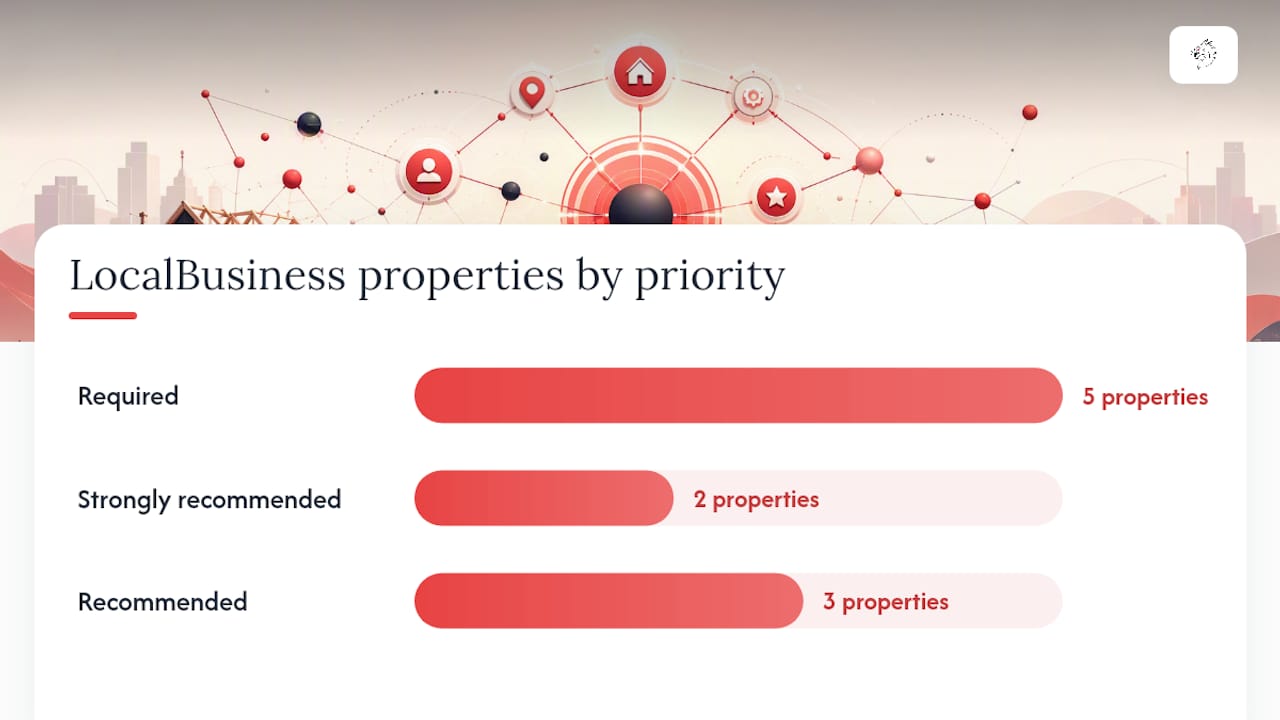
| Property | Purpose | Required or optional |
|---|---|---|
| `@id` | Stable unique identifier for the entity graph | Required |
| `name` | Exact business name matching your Google Business Profile | Required |
| `address` | Nested PostalAddress with street, city, state, zip | Required for physical locations |
| `telephone` | Primary contact number, consistent across all listings | Required |
| `geo` | GeoCoordinates for latitude and longitude | Strongly recommended |
| `openingHoursSpecification` | Structured daily hours | Strongly recommended |
| `priceRange` | Relative cost indicator | Recommended |
| `image` | Real photo of location, team, or vehicle | Recommended |
| `sameAs` | Links to verified social and directory profiles | Recommended |
| `areaServed` | Service radius for mobile or multi-town businesses | Required for service-area businesses |
One detail contractors overlook: choosing the most specific LocalBusiness subtype available unlocks properties generic LocalBusiness doesn't have. A plumbing company should use `Plumber`, not the generic parent type. An HVAC contractor should use `HVACBusiness`. These subtypes exist specifically because Schema.org recognized that a locksmith and a dentist have different property needs, and search engines reward the specificity because it removes ambiguity about what kind of business you actually are.
A quick warning on `AggregateRating`: only add review markup when genuine review content is visible on that same page. Schema.org treats fabricated or borrowed review data as a policy violation, and Google has penalized sites for exactly this shortcut.
How to Implement LocalBusiness Schema on Your Site
Getting the code right matters less than getting the workflow right. Here's the order that avoids rework.
- 1.Gather your canonical facts first. Before writing a single line of JSON-LD, confirm your exact business name, address format, phone number, and hours against your Google Business Profile. This sounds obvious. It's the step almost everyone skips, and it's the source of most schema errors months later.
- 2.Author the JSON-LD as a single business node with a stable `@id`. Place the full LocalBusiness block, or the most specific subtype you qualify for, on your homepage. This is the one place you define every property in full.
- 3.Reference that `@id` from every other page instead of repeating the full block. Service pages, contact pages, and location pages should link back to the homepage entity rather than redefining name, address, and phone all over again. This single-authority pattern is the most reliable way to scale schema without creating conflicting entity signals across your site, a lesson Formative Digital's implementation guide makes explicit with its @graph examples.
- 4.Add Service nodes on individual service pages when you're describing a specific offering, drain cleaning, panel upgrades, roof replacement. Use the `provider` property to point that Service node's `@id` reference back to your LocalBusiness node. Schema.org's Service type documentation shows this provider-to-business linkage directly, and it's the cleanest way to tell search engines "this specific service comes from this specific business" without duplicating your business details on every service page. For multi-part offerings, use `OfferCatalog` rather than creating a separate business entity per service.
- 5.Decide on placement: JSON-LD scripts typically go in the `` of the page, though Google accepts them in the `` as well. Consistency matters more than the exact placement, pick one convention and use it site-wide so future edits don't create duplicate or conflicting blocks.
- 6.Validate before you deploy. Run the code through Google's Rich Results Test and the Schema.org validator. Fix every error and warning before pushing live, not after.
- 7.Deploy, then monitor. Once live, check Search Console's structured data reports periodically, not just once. Schema errors tend to surface weeks after deployment when Google recrawls and reprocesses your pages.
Pro Tip: Keep the text customers actually see on the page identical to what your JSON-LD claims. If your visible footer says "Open 8am to 6pm" but your schema says "9am to 5pm," you've created a mismatch that erodes trust in both, and Google's systems are built to catch exactly this kind of inconsistency.
If you're managing this through a CMS with template restrictions, this is often where DIY implementation runs into walls, worth knowing before you commit hours to a fix that your platform won't actually support. A conversion-optimized site rebuild sometimes solves more of this than patching schema into an inflexible template.
Multi-Location and Service-Area Patterns That Scale
A single-location plumbing business and a five-location HVAC franchise need fundamentally different schema strategies, and treating them the same is where scaling mistakes happen.
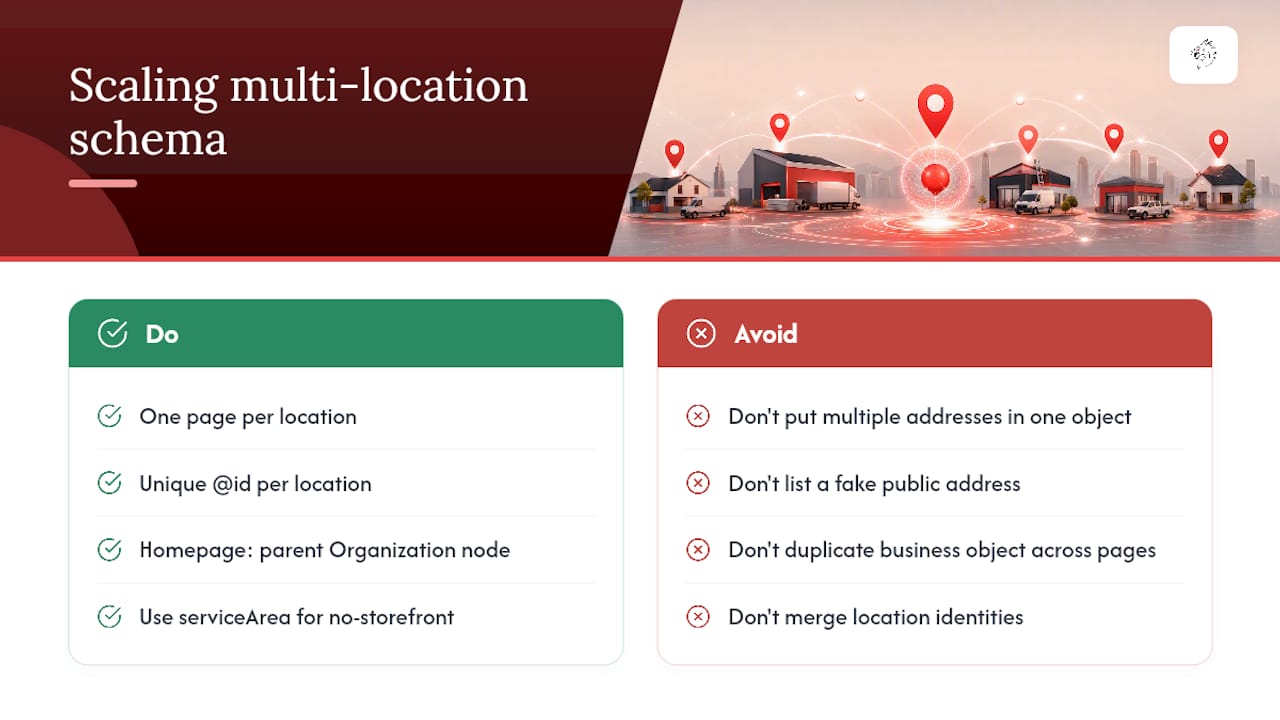
Each physical location gets its own URL, its own page, and its own schema block with a unique `@id`. Do not create one master LocalBusiness object and try to stuff five addresses into it. Multi-location implementation guides are consistent on this point: one location, one page, one schema block, one `@id`. Trying to shortcut this creates exactly the kind of entity confusion that undermines the whole point of structured data.
Your homepage should carry a parent Organization node that represents the brand as a whole, with each location page linking back to it. This tells search engines "these five locations all belong to the same company" without merging their individual identities, which matters because customers searching for your Thousand Oaks location shouldn't be shown your Ventura hours or address.
For service-area businesses that don't want a public storefront address listed, resist the temptation to list a fake or residential address just to satisfy the `address` field. Use `areaServed` to define your coverage zone instead. Google's own guidance treats a false public address as a policy risk, not a workaround, and it can backfire on your Google Business Profile standing as much as your schema.
The mistake to avoid above all others: duplicating the full business object, name, address, phone, hours, across every service and location page instead of referencing a single defined entity. It looks harmless in a code editor. At scale, across dozens of pages, it creates dozens of slightly-drifting versions of your business facts, and search engines have no reliable way to know which one is authoritative. A multi-location SEO scaling guide covers this same pitfall from the broader local SEO angle, worth a look if you're planning expansion beyond three or four locations.
Validation, Common Errors, and How to Fix Them
Two tools do almost all the validation work you need. Google's Rich Results Test checks whether your markup is eligible for rich results and flags syntax problems immediately. The Schema.org validator checks broader structural compliance against the vocabulary itself. Run both before deployment, then keep an eye on Search Console's structured data reports afterward, errors sometimes surface only after Google recrawls the page weeks later.
The errors that show up most often, and how to fix them:
- —NAP mismatch: your schema says one phone number, your Google Business Profile says another, and your visible footer says a third. Fix: audit all three sources against each other and correct until they're identical, character for character.
- —Duplicated business blocks: the same full LocalBusiness object repeated across service and location pages instead of referenced by `@id`. Fix: consolidate to a single homepage definition and reference it elsewhere.
- —Invalid JSON syntax: a missing comma or bracket that breaks the entire block silently. Fix: run every deployment through the Rich Results Test before it goes live, not after.
- —Fabricated or borrowed review data: `AggregateRating` markup with no visible reviews on the page. Fix: remove the property entirely unless genuine reviews are shown on that same page.
- —Stale hours: schema listing hours that haven't been updated for a holiday closure or seasonal change. Fix: build hours updates into your seasonal checklist, not as a one-time setup task.
Independent analysis backs up why the NAP issue specifically matters so much: keeping structured data facts identical to your Google Business Profile and visible page text is flagged as the single biggest real-world cause of schema not being trusted by search systems. It's not a minor formatting quibble, it's the difference between search engines citing your business confidently and treating your data as unreliable.
If Search Console flags an error after you've fixed the underlying code, request reindexing through the URL Inspection tool rather than waiting for Google's normal recrawl schedule. For sites with dozens of location pages, submitting an updated sitemap alongside the fix speeds up how quickly the correction propagates.
Implementation Checklist: The Exact Rollout Order
Follow this sequence and you'll avoid almost every mistake covered above.
- 1.Canonicalize your NAP data. Confirm exact name, address, phone, and hours match your Google Business Profile before writing any code.
- 2.Align visible page content with what you're about to mark up. Your footer, contact page, and schema need to say the same thing.
- 3.Deploy the homepage LocalBusiness block using the most specific subtype available, with a stable `@id`.
- 4.Reference that `@id` from service and location pages rather than repeating the full business object.
- 5.Add Service nodes to individual service pages, connected to your LocalBusiness via the `provider` property.
- 6.For multiple locations, create separate pages and schema blocks per address, each with its own unique `@id`.
- 7.Validate everything with the Rich Results Test and Schema.org validator before pushing live.
- 8.Monitor Search Console's structured data reports on an ongoing basis, not just at launch.
Why Entity Clarity Matters More Than Most Contractors Realize
Clean LocalBusiness schema does more than help Google's algorithm. It's increasingly how AI search tools and knowledge panels extract accurate facts to answer voice and chat-based queries about who's open, who's nearby, and who does the specific job a customer needs done. When a homeowner asks an AI assistant "who does emergency water heater repair near me," the systems answering that question lean on structured, verifiable data, not guesswork from unstructured web pages.
Vaultio builds this entity clarity into every local SEO engagement for home service contractors, because a knowledge panel or AI citation that gets your hours or service area wrong doesn't just look sloppy, it actively costs you the job. Pairing clean schema with fast lead response is where the real payoff shows up: case studies from home service businesses working with Vaultio point toward the kind of consistent job flow, in the range of 10 to 15 extra jobs a month, that comes from combining accurate entity signals with instant follow-up when a lead comes in.
The technical fix, matching your schema to your Google Business Profile down to the punctuation, isn't glamorous work. But it's the foundation for everything else, rankings, AI citations, lead routing, gets built on top of.
A localized Local Service Ads strategy layered on top of clean schema gives contractors two verified, consistent signals pointing search engines toward the same trustworthy business facts.
— Damian
Should You DIY Your Schema or Hire It Out?
Handling this yourself works fine if you're a single-location business comfortable pasting a JSON-LD block into your homepage template and running it through the Rich Results Test. The math changes once you're managing five, ten, or twenty locations, once your citations across directories are already inconsistent, or once your CMS restricts where you can inject custom code.
Watch for these red flags: a Google Business Profile that doesn't match your website, multiple platforms (website, booking system, review widget) each showing slightly different business facts, or an internal team with no bandwidth to monitor Search Console reports monthly. If you're evaluating an agency to handle this, ask directly how they test their markup, whether they use a single-`@id` graph pattern across your site, and how often they monitor for drift after launch. Vague answers on any of those three questions are worth pushing back on.
Vaultio Handles the Schema Work So You Don't Have To
LocalBusiness schema is often built as part of a full local SEO engagement, not as an isolated add-on you have to coordinate separately. Where a DIY approach means you're pasting JSON-LD into a template and hoping it survives your next site update, tying the schema graph directly into your rankings work, Google Business Profile, and lead-response system helps keep the entity facts consistent everywhere a customer or an AI search tool might find you.

Typical deliverables include a homepage LocalBusiness or subtype node with a stable `@id`, Service nodes connected across your site, multi-location schema for franchise or branch operations, and ongoing monitoring so hours, service areas, and pricing stay current as your business changes. DIY still makes sense for a single location with a simple site and someone willing to check Search Console monthly. For contractors juggling multiple locations, inconsistent citations, or a CMS that fights every code change, that's exactly the gap Vaultio's local SEO services for home service contractors close. If you're in the Santa Barbara area, get a look at what localized SEO work looks like for contractors in your market and see where your current schema and citations stand today.
Where to Verify This Yourself
Don't take implementation advice on faith, check it against the primary sources. Schema is the canonical property reference, and it lists every subtype available for your specific trade. For testing tools, a free JSON-LD schema generator can speed up authoring valid blocks before you run them through validation.
- —Schema
- —Google's structured data guide for Local Business
- —Practical LocalBusiness JSON-LD implementation guide
- —Free JSON-LD schema generator tool
Sources
- —Schema
- —Local Business (LocalBusiness) structured data
- —LocalBusiness Schema: Complete Guide (2026)
- —Local Schema Markup: The LocalBusiness JSON-LD Guide | Fokal Guides
FAQ
What Is LocalBusiness Schema?
LocalBusiness schema is a structured data vocabulary from Schema.org that describes a physical business location using machine-readable properties like name, address, phone number, hours, and geographic coordinates.
Can You Give an Example of LocalBusiness Schema?
A basic example includes `@type: "LocalBusiness"` (or a specific subtype like `Plumber`), paired with `name`, a nested `address` object using `PostalAddress`, `telephone`, `openingHoursSpecification`, and a stable `@id` that other pages on the site reference.
How Do I Add LocalBusiness Schema to My Website?
Author a JSON-LD block containing your business's canonical facts, place it in your homepage's `
` or ``, then validate it with Google's Rich Results Test before deploying it live.What Is a Business Schema?
Business schema is the general term for structured data types, LocalBusiness, Organization, and Service among them, that describe a company, its physical locations, and the offerings it provides in a format search engines and AI tools can read directly.
Does LocalBusiness Schema Improve Local Rankings by Itself?
No. Schema reinforces entity clarity and NAP consistency, but Google Business Profile completeness, proximity, and review volume remain the primary factors behind local-pack placement.
Recommended
Ready to Implement This?
Your new site live within 8 days. No contracts. If your organic traffic doesn't grow within 90 days, we refund you in full.