Data First 8 Step Lead Routing Launch for Contractors and Operators
# Data First 8 Step Lead Routing Launch for Contractors and Operators
Lead routing is the process of automatically assigning an incoming lead to the right rep, team, or queue based on data like territory, deal size, or product interest. The single best practice: automate routing on a clean data model with enforceable service-level agreements, hitting demo requests within 5 minutes and high-intent content downloads within 15. Everything else in this guide builds on that one rule.
*
TL;DR: - Reliable lead routing depends on having clean, complete, and standardized data fields such as domain, location, industry, and job title. - Most teams start with round-robin routing and should only add complexity like territory or weighted models after simple setups show misroutes or delays. - Enforcing fast SLA response times, especially within five minutes for demo requests, is critical, and automatic reassignments prevent leads from going stale. - Regular audits of rules, owners, fallback queues, and unmatched leads are necessary to prevent routing drift and maximize pipeline efficiency. - AI enhances lead routing through predictive scoring, real-time enrichment, and summarization, but human oversight remains essential for transparency and bias detection.
*
Table of Contents
- —What Is Lead Routing and How Does It Work?
- —Which Lead Routing Model Fits Your Team?
- —What Data Do You Need Before You Automate Routing?
- —How Do You Design Routing Rules and Enforce SLAs?
- —What Happens When a Rep Is Unavailable?
- —How Often Should You Audit Your Lead Routing?
- —Where Does AI Actually Improve Lead Routing?
- —How Do You Implement Lead Routing Step by Step?
- —Why Speed and Data Discipline Beat Clever Routing Logic
- —Get Lead Routing and Instant Response Built for Your Trade
- —Sources
What Is Lead Routing and How Does It Work?
Lead routing decides, in the seconds after a form fill, who talks to that prospect next. Get it right and you cut lead leakage, shrink response time, and stop good leads from rotting in a shared inbox. Get it wrong and your best rep never even sees the lead that was made for them.
Automated routing evaluates incoming lead data against a rule set the moment a lead hits your system, then fires the matching assignment instantly, no human triage required. It checks fields like job title, company size, and source, compares them against your rule logic, and pushes the lead to a queue or owner in real time.
Routing does not operate alone. It sits inside a chain:
- —Score: the lead gets a fit and intent rating.
- —Enrich: missing data (company domain, employee count, industry) gets filled in.
- —Route: the enriched, scored lead hits your rules engine and lands with an owner.
- —Contact: the rep or an automated system reaches out inside the SLA window.
Break any link in that chain, and speed stops mattering. A rep who gets a lead in 90 seconds with no context still loses the deal to guesswork.
Which Lead Routing Model Fits Your Team?
Most teams over-engineer routing before they need to. The right model depends on headcount, how leads are owned, and how fast your pipeline is growing. Four models cover nearly every scenario:
- 1.Round-robin routing. Leads rotate evenly across a rep pool in a fixed sequence. It requires almost no setup data beyond a rep list, which makes it the default for small, undifferentiated teams where every rep can sell every deal. Round-robin lead routing breaks down fast once reps specialize by industry, region, or deal size, because "next in line" ignores fit entirely.
- 2.Weighted routing. Leads get distributed based on rep capacity, close rate, or seniority rather than pure rotation. A senior rep might get 40% of leads while a ramping new hire gets 10%. This model needs performance data feeding the routing engine continuously, and it works best once you have enough historical conversion data to weight fairly.
- 3.Territory routing. Leads route by geography, often mapped to ZIP code, state, or country. It requires a maintained territory map and clean location fields on every lead. Territory models make sense the moment reps are compensated or quota-carrying by region, and they fail immediately if your address data is messy.
- 4.Account-based routing. Leads route based on which account owns the relationship, matching new contacts to existing accounts rather than treating every lead as a stranger. This demands reliable lead-to-account matching, usually against a CRM account list, and it is essential for any team running account-based sales motions where multiple contacts from one company need to land with the same owner.
Most teams start with round-robin, then graduate to territory or weighted routing once they notice mismatched leads piling up in win-loss reviews. That transition point, not a calendar date, is the real signal to add complexity, since routing systems deliver the best return when complexity grows only after simple models show measurable misroutes.
What Data Do You Need Before You Automate Routing?
Automated lead routing is only as good as the data feeding it. A perfectly designed rule set will misfire constantly if the underlying fields are missing, inconsistent, or stale, since routing breaks down when data is incomplete or non-standard.
A handful of fields drive most routing decisions:
- —Company domain — the single most reliable key for account matching.
- —HQ location — required for any territory-based logic.
- —Industry or vertical — needed for segment and specialization rules.
- —Employee count or revenue band — used to separate enterprise from SMB motions.
- —Job title or seniority — filters out non-decision-makers from high-touch queues.
- —Verified contact info — a working email and phone number, not just a submitted one.
Real-time enrichment, pulling missing data at the moment a lead arrives rather than in a nightly batch job, matters more than most teams assume. A lead that sits unenriched until the next overnight sync has already blown past any 5-minute SLA before a rule even fires.
Field normalization deserves its own attention. "CA," "Calif.," and "California" need to resolve to one value, or your territory rules will silently drop leads into a fallback queue. Hierarchy mapping, tying a subsidiary back to its parent account, and deduplication against existing contacts both prevent the same lead from generating two conflicting owners.
Pro Tip: Run a monthly export of unmatched leads and manually check what field caused the miss. Nine times out of ten it is a domain mismatch or a location field written three different ways across your forms.
How Do You Design Routing Rules and Enforce SLAs?
Rule design comes down to one principle: specific rules override general ones. If you rank rules in the wrong order, a broad catch-all fires before the precise rule meant for a high-value account ever gets evaluated.
A practical priority stack, top to bottom:
- —Named account or existing customer contact → route to current account owner.
- —Enterprise employee count + target industry → route to enterprise team.
- —Territory match on HQ location → route to regional rep.
- —Product-specific intent (pricing page, demo request) → route to specialist queue.
- —Everything else → default round-robin pool.
SLA enforcement is where most of the actual revenue protection happens. Industry benchmarks call for contacting demo or pricing requests within 5 minutes, and high-intent content downloads within 15 minutes, and the reasoning holds up under scrutiny: conversion rates drop sharply as response time increases, a pattern confirmed across large samples in the Lead Response Management study.
Every SLA needs teeth. A target with no enforcement action behind it is a suggestion, not a rule. Build automatic reassignment into the rule stack itself: if a rep does not log an activity within the SLA window, the lead reassigns to the next available rep and the manager gets an alert.
What Happens When a Rep Is Unavailable?
Routing logic that ignores rep availability guarantees leads pile up with reps who are out sick, in back-to-back demos, or already buried in unworked leads. Capacity-aware routing checks current workload before assignment, not just territory or ownership, which preserves rep bandwidth and cuts reassignment churn.
Three components make availability-aware routing work in practice:
- 1.Set workload caps per rep. Cap active lead counts so no single rep becomes a bottleneck while others sit idle.
- 2.Build a fallback queue for every rule. Every routing path needs a default destination for when the primary owner is unavailable, out of office, or the account owner has left the company. A rule with no fallback is the most common misconfiguration teams discover, usually after leads have already gone stale.
- 3.Automate escalation on SLA breach. When a lead sits untouched past its SLA window, trigger an automatic reassignment and fire a manager alert simultaneously, rather than waiting for a human to notice.
This is where after-hours coverage gets tested hardest. Contractors and field-service teams see this constantly, since a big share of inbound calls land outside standard business hours, and a routing rule with no after-hours fallback simply loses those leads until morning, which is why solutions like The Build streamline purchasing, projects & profits are essential for improving workflow and operations in home services.
How Often Should You Audit Your Lead Routing?
Routing logic decays quietly. A rep leaves, a territory map goes stale, a rule someone built eighteen months ago still fires even though the team it served no longer exists. A structured audit cadence catches this drift before it costs you pipeline.
A monthly review should check:
- —Rule ownership — does someone still own and understand every active rule?
- —Fallback hit rate — how many leads are landing in default queues instead of primary rules?
- —Unmatched leads — which leads failed enrichment or matching entirely?
- —Stale owners — are any rules still pointing to reps who changed roles or left?
Track five metrics continuously rather than waiting for the monthly review to surface problems: time-to-assignment, time-to-first-touch, SLA compliance rate, reassignment rate, and lead-to-opportunity conversion by routing path. A spike in reassignment rate almost always means a capacity limit or a stale rule, not a rep performance problem.
Test every rule path deliberately, not just when something breaks. Submit a test lead through each branch of your rule stack and log the actual outcome outside the routing tool itself, in a shared doc or spreadsheet, so you have a record when someone asks why a rule fired the way it did.
Where Does AI Actually Improve Lead Routing?
AI earns its place in routing through three jobs: predictive scoring that ranks fit and intent before a human ever looks at the lead, enrichment that fills data gaps in real time, and summarization that hands a rep a two-line brief instead of a raw form submission. Each of these supplements a rep's judgment rather than replacing your routing rules outright.
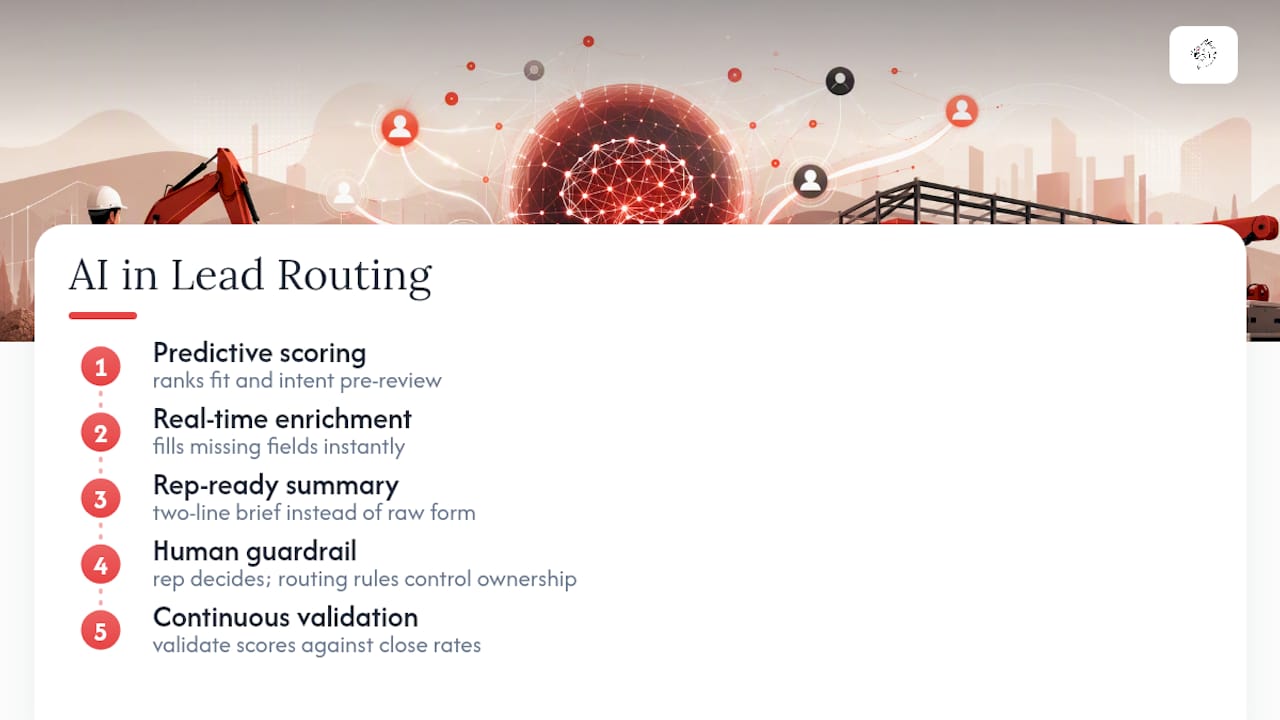
The guardrail matters as much as the use case. Keep a human in the loop on any AI-influenced decision that changes lead ownership, validate the model's scoring against real close-rate data on a regular cycle, and check for bias creeping in through proxy fields like ZIP code or company name. AI should generate context that helps a rep personalize outreach, not silently reassign leads with no explanation trail.
Pro Tip: If a rep can't explain why the AI scored a lead the way it did, that model isn't ready for production. Explainability is the line between decision support and a black box you can't defend to your CRO.
How Do You Implement Lead Routing Step by Step?
Treat this as a launch checklist, not a one-time project. Routing needs revisiting every time your team, territories, or product line changes.
- 1.Map every lead source. List every form, chatbot, LSA lead, and inbound call channel feeding your pipeline, and confirm each one passes the required fields (domain, location, title) into your CRM.
- 2.Choose your starting model. Pick the simplest model that fits your current team structure, round-robin for small undifferentiated teams, territory or account-based for anything more specialized.
- 3.Build and rank your rules. Write rules from most specific to most general, and document the priority order somewhere outside the tool itself.
- 4.Set SLA targets and enforcement actions. Configure the 5-minute and 15-minute windows, define what happens on breach, and connect alerts to a channel your managers actually check.
- 5.Test every rule path. Run test leads through each branch, confirm the right owner gets the assignment, and log the results so you have a baseline before going live.
- 6.Launch and monitor daily for the first two weeks. Watch fallback hit rate and unmatched leads closely during this window, since early data reveals gaps fast.
- 7.Run a 30-day audit. Check every metric from the audit section above against your pre-launch baseline and fix whatever drifted.
- 8.Operate on a monthly cadence going forward. Enforce SLAs continuously, audit monthly, and update rules whenever territory, headcount, or product lines shift.
Teams that skip step five, testing before launch, are the ones who discover six months later that an entire territory has been silently routing to the wrong queue. A documented follow-up process paired with this checklist closes that gap before it costs you real pipeline.
Why Speed and Data Discipline Beat Clever Routing Logic
Most teams treat lead routing as a rules-engineering problem. It is really a data discipline problem wearing a rules-engineering costume. The fanciest weighted, AI-scored routing stack in the world produces garbage assignments if the domain field is inconsistent or the enrichment step runs six hours after the lead already went cold.
What surprises people once they audit their own setup: the leads that convert worst are rarely the ones that got routed to the "wrong" rep. They are the ones that sat in a queue with no fallback, no SLA alert, and no one accountable for noticing. Contractors live this every day. A missed call at 9 PM on a Saturday is not a routing model failure. It is a fallback failure, and fallback failures are the cheapest problem in this entire guide to fix.
If there is one contrarian take worth sitting with: stop optimizing your rule stack before you have fixed your data. Fix the domain field, the location field, the fallback queue. Then worry about whether round-robin or weighted routing is the smarter long-term model.
— Damian
Get Lead Routing and Instant Response Built for Your Trade
Home service contractors do not have a rules-engine problem. They have a "nobody answered fast enough" problem, and it costs 10 to 15 booked jobs a month in leads that quietly went to a competitor instead. Vaultio builds the routing, AI lead scoring, and instant response system into your marketing setup from day one, so every call, form fill, and chat message gets assigned and answered inside the SLA windows this guide just walked through, not eventually.

That means a lead who fills out a form at 10 PM gets an instant AI response and a booked appointment on your calendar before your competitor's voicemail even picks up. If you run HVAC, plumbing, electrical, roofing, or a similar trade and want routing and response handled for you instead of built by hand, start with AI lead scoring for your market and see what a properly enforced SLA does to your booked-job count in the first 30 days.
Sources
- —10 Marketing Ops SLA essentials for demand gen in 2026
- —The short life of online sales leads
- —What is lead routing
- —Lead routing: operator's guide to assignment logic, models, and optimization
Recommended
Ready to Implement This?
We'll build your complete lead generation system in 72 hours. No contracts. 30-day money-back guarantee.