Turn Calls Into Booked Jobs with Dynamic Number Insertion for Contractors

# Turn Calls Into Booked Jobs with Dynamic Number Insertion for Contractors
Dynamic Number Insertion (DNI) swaps the phone number on your website for a unique tracking number tied to each visitor's source or session, so every call gets credited to the campaign, keyword, or channel that generated it. The setup runs on a JavaScript snippet, a pool of tracking numbers, and integrations with your ad platforms and analytics. Get those three pieces right, and phone leads become as measurable as form fills.
*
TL;DR: - Source-level DNI is sufficient for small campaigns, while larger setups require session or keyword-level tracking for greater attribution precision. - Proper setup requires careful number pool provisioning, sitewide snippet installation, and session rules to ensure accurate call attribution and avoid mixing data. - Most DNI failures happen due to non-detectable number formats, improper handling of single-page apps, pool exhaustion during traffic spikes, or cross-domain session issues. - Integrating DNI with Google Ads and CRM systems is essential for capturing keyword-level data and turning call attribution into actionable marketing insights. - Only implement DNI if phone calls significantly influence your lead volume and ad spend, starting with source-level tracking before adding more detailed layers.
*
Table of Contents
- —How Does Dynamic Number Insertion Work?
- —What Business Results Does Call Tracking Actually Deliver?
- —Which Type of DNI Fits Your Campaign?
- —How Do You Set Up Dynamic Number Insertion Correctly?
- —How Many Tracking Numbers Do You Actually Need?
- —Why Isn't Your Tracking Number Swapping Correctly?
- —What Privacy and Local SEO Rules Apply to DNI?
- —How Do Google Ads and CRM Integrations Complete the Picture?
- —How Does DNI Fit Into a Full Lead-Response System?
- —When Should You Actually Implement DNI?
- —Turn Every Attributed Call Into a Booked Job
- —Where to Go for Implementation Details
- —Sources
How Does Dynamic Number Insertion Work?
DNI runs on a simple loop, but every step matters. Here's the flow from click to credited call:
- 1.Detection. A snippet on your site reads the visitor's referrer, UTM parameters, or Google Ads gclid the instant they land.
- 2.Assignment. The script pulls an available number from your tracking pool and assigns it to that session or traffic source.
- 3.Swap. Every visible phone number and every `tel:` link on the page gets replaced with the assigned tracking number. This matches Dynamic Number Insertion's core function as a call tracking technique tied to ad sources.
- 4.Persistence. That number sticks with the visitor as they browse other pages, so the swap doesn't reset mid session.
- 5.Call logging. When the visitor dials, the call routes through the tracking number to your real line, and the platform logs a call detail record (CDR).
- 6.Attribution. The CDR joins back to the original session data, pinning the call to the exact campaign, keyword, or referral source that started it.
Some platforms bundle this entire loop with dashboards and built-in numbers. Others hand you raw carrier DIDs and CDRs, leaving the joins to your own analytics stack. Either way, the mechanics are identical.
What Business Results Does Call Tracking Actually Deliver?
The real payoff isn't the technology. It's what you can finally see once phone leads stop being a black box.
DNI gives phone-driven businesses the same campaign-level clarity that e-commerce and form conversions have had for years. That changes budget decisions fast.
- —Keyword and campaign visibility. You see which search term, ad, or landing page actually triggered the call, not just which one got the click.
- —Sharper ROI math. Once calls tie back to spend, you can reallocate budget toward the keywords producing booked jobs, not just clicks.
- —Bid adjustments backed by real conversions. Feed call data into your bidding strategy and stop paying for traffic that never converts.
- —Call quality layers. Recordings and AI transcription add lead-quality scoring on top of raw attribution, showing which calls were real prospects versus wrong numbers.
Paid search accounts benefit most immediately, but local service-area businesses, after-hours emergency lines, and location-based ad campaigns all lean on DNI to prove which dollars are working.
Which Type of DNI Fits Your Campaign?
Not every business needs the most granular setup, and buying more complexity than you can use just burns budget on unused numbers.
- —Source-level DNI. One tracking number per traffic source (organic, paid, referral). Cheapest to run, easiest to manage, and a solid starting point for smaller campaigns.
- —Session-level DNI. A unique number for every concurrent visitor, which supports joining calls to a visitor's full click path. This gets you complete session-level attribution, but it demands a bigger number pool.
- —Keyword-level DNI. The most granular tier. It requires integration with Google Ads to capture the gclid parameter, mapping calls to the exact paid keyword that drove the click.
Each step up buys more precision at the cost of more numbers, more setup, and more moving parts to maintain. Match the tier to what your reporting actually needs, not what sounds impressive on a dashboard.
How Do You Set Up Dynamic Number Insertion Correctly?
Get these steps right the first time, and you skip weeks of attribution gaps later.
- 1.Provision your number pool. Decide between local and toll-free numbers based on how your audience expects to see them, and route each one to your existing line.
- 2.Install the DNI snippet sitewide. Configure it to run on every page, not just the homepage or contact page.
- 3.Format phone numbers as plain HTML text. CallRail's documentation confirms the swap script needs standard, detectable formats and a defined swap target to work reliably, and numbers buried in images or oddly styled text won't get caught.
- 4.Set session rules. Define how long an assigned number sticks around, whether that's cookie-based or localStorage, and whether it needs to persist across subdomains.
- 5.Connect Google Ads and your analytics or CRM. This is what turns raw calls into keyword-level and lead-level records you can actually act on.
- 6.Test before you trust it. Load the site from different sources, confirm the swap fires, and place a real test call to check the CDR lands where expected.
Pro Tip: Add a consistent CSS class or data attribute to every phone number element across your templates. It makes the swap deterministic no matter which page template a number sits on, which is a fix CallRail specifically recommends for sites with inconsistent formatting.
How Many Tracking Numbers Do You Actually Need?
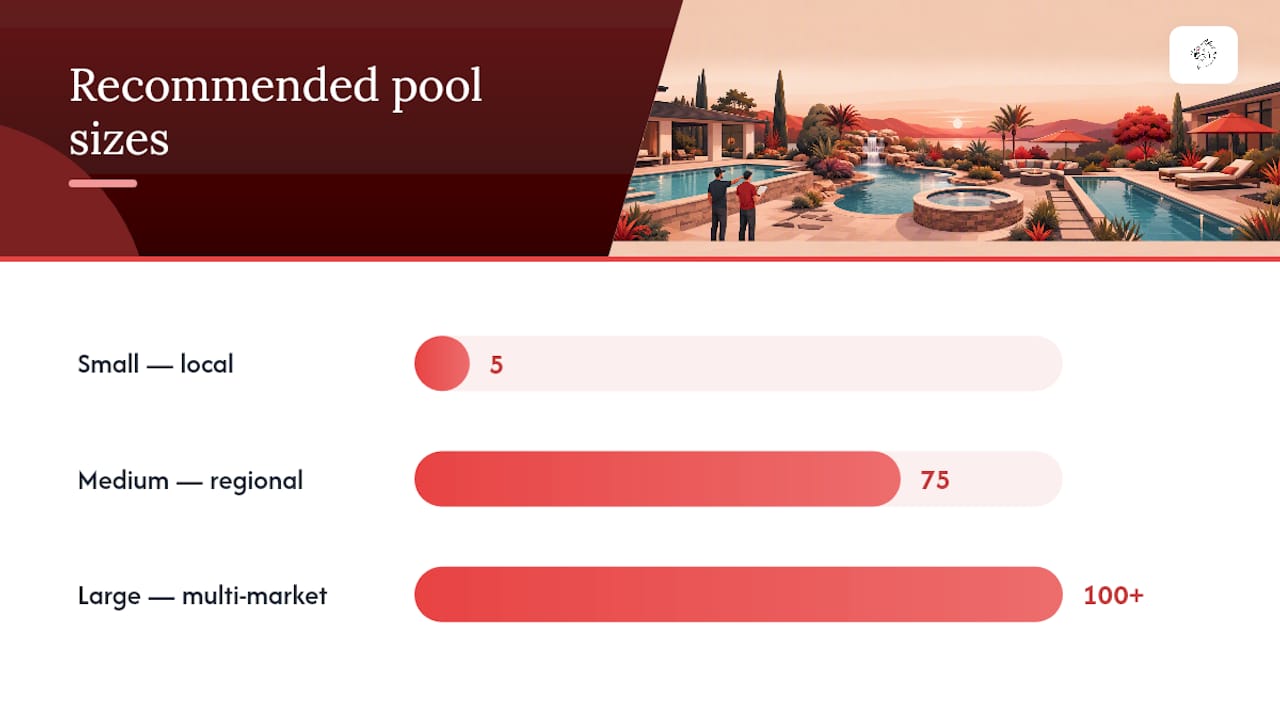
Size your pool around peak concurrent visitors who are likely to call, not your total daily traffic. A site with 2,000 daily visitors but only 15 people browsing at once during peak hours needs a fraction of the numbers a naive calculation would suggest.
Vendor guidance recommends starting with 75 to 100% of peak concurrent visitors and adjusting from there based on real utilization data.
| Site size | Estimated peak concurrent visitors | Starting pool size |
|---|---|---|
| Small (local service business) | 5–15 | 5 numbers |
| Medium (regional campaigns) | 75 | 75 numbers |
| Large (multi-market or national) | 100+ | 100+ numbers, tiered by channel |
Watch utilization closely after launch. The rule of thumb is to set alerts once usage crosses 75%, giving you room to add numbers before visitors start sharing a tracking number and attribution starts blurring together. Also track untracked calls, CDR completeness, and how often numbers get reused too quickly after a call ends.
Why Isn't Your Tracking Number Swapping Correctly?
Most DNI failures trace back to one of four culprits.
- —Non-detectable numbers. A phone number inside an image, split across multiple elements, or written in a nonstandard format won't get picked up by the swap script, a known limitation CallRail flags directly.
- —Script timing on single-page apps. If your site is a SPA, the swap needs to re-fire on every route change, not just the initial load, since route changes don't reload the page the way traditional sites do.
- —Pool exhaustion. Running out of available numbers during a traffic spike forces a fallback to the default number, silently breaking attribution until you scale the pool.
- —Cross-domain scope mistakes. If your cookie or session scope doesn't extend across subdomains, visitors moving between them can get reassigned numbers mid-journey.
Pro Tip: Build in a quarantine window before reassigning any tracking number. This prevents a customer calling back an hour later from getting misattributed to a different session than the one that actually converted them.
What Privacy and Local SEO Rules Apply to DNI?
DNI touches both privacy disclosures and local search signals, and skipping either one creates problems later.
- —Some DNI cookies function as strictly necessary for the swap to work, but disclose any that support marketing tracking separately in your privacy policy.
- —Keep your canonical business number authoritative in structured data and directory listings. Preserving the canonical number in schema prevents DNI swapping from damaging your NAP consistency for local search.
- —Leave the real number visible to crawlers where possible, since some implementations deliberately keep the canonical number intact for bots while swapping only what human visitors see.
- —One line covers most disclosure needs: "We use dynamic phone number tracking to measure marketing campaign performance."
How Do Google Ads and CRM Integrations Complete the Picture?
DNI's real value shows up once it talks to the rest of your stack.
- —Google Ads. Capture the gclid parameter on arrival and store it with the session record. This is what makes keyword-level attribution possible instead of just knowing "some paid search visitor called."
- —Analytics and CRM. Pass session metadata and CDRs into your analytics platform so a marketer, not just an engineer, can see which campaigns produced calls. Check how your current website setup handles this before assuming it's already wired correctly.
- —Recordings and AI transcription. Layer these on top for lead-quality scoring, separating real booked-job callers from spam and wrong numbers.
- —Feedback loop. Route the attributed call data back into your bidding rules and reporting dashboards so the campaigns producing real calls get more budget, not just more clicks.
How Does DNI Fit Into a Full Lead-Response System?
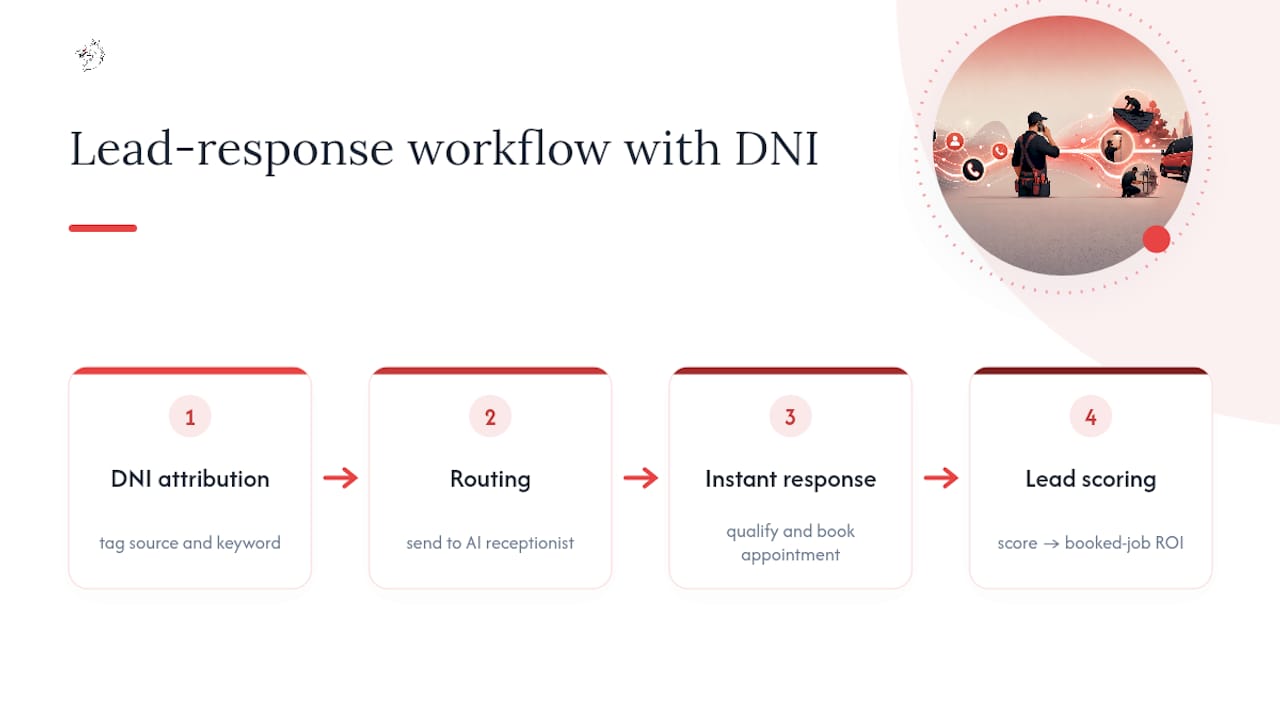
DNI answers "which campaign drove this call." It doesn't answer what happens next, and for home service contractors, that gap is where jobs get lost — a reality well understood in the home-service and supply distribution industry.
A tighter flow looks like this: DNI attributes the call, routing sends it to an AI receptionist or chatbot that answers within seconds, qualifies the caller, and books the appointment before a competitor even picks up. DNI-derived fields, like source and keyword, feed directly into lead scoring, showing which campaigns produce booked jobs, not just ringing phones. Pairing attribution with instant response systems is where the real ROI shows up.
When Should You Actually Implement DNI?
DNI earns its cost the moment phone calls make up a real share of your leads and you're spending real money on paid search or local ads. If your calls come mostly from referrals or repeat customers, skip it. You're paying for precision you don't need.
Start with source-level DNI. Prove it changes budget decisions before scaling to session or keyword-level tracking. Watch utilization, call quality, and cost per booked job for at least one full campaign cycle before adding complexity you can't yet justify.
— Damian
Turn Every Attributed Call Into a Booked Job
Attribution tells you which campaign made the phone ring. It won't answer that phone, qualify the caller, or get them on your calendar before they call the next contractor on the list. That's the gap between measuring leads and capturing jobs, and it's exactly where Vaultio operates.

Vaultio pairs call attribution data with instant, always-on lead response, engaging every inbound call or inquiry within seconds so the leads your DNI setup identifies actually convert into booked work instead of voicemail. Combined with Google Ads management built for contractors and conversion-focused website design that keeps phone numbers formatted correctly for tracking, the whole system feeds one goal: more jobs on your calendar every month. Contractors in the Central Coast market can see how this works locally through Goleta SEO services or by checking real results from other home service businesses. We offer a satisfaction guarantee; the next step is to request a market availability check and explore a full attribution-to-booking system for your business.
Where to Go for Implementation Details
For code-level setup, CallRail's dynamic number insertion overview covers snippet installation and swap-target configuration in detail. Twilio's DNI glossary entry explains the underlying call-tracking mechanics. For pool sizing math and monitoring thresholds, see VeloCalls' sizing and troubleshooting guide, and for session-level attribution logic, review SIPNEX's breakdown of DNI types.
Sources
- —Dynamic number insertion overview CallRail Help Center
- —Dynamic Number Insertion (DNI) Guide: Setup, Sizing, and Troubleshooting | VeloCalls Blog
- —What is Dynamic Number Insertion (DNI)?
- —Dynamic Number Insertion (DNI), Explained | SIPNEX
Recommended
Ready to Implement This?
Your new site live within 8 days. No contracts. Top 3 on Google in 3 months, or we work free until you are.