6 Plug and Play Steps to Turn Contractor Testimonials Into Booked Jobs
# 6 Plug and Play Steps to Turn Contractor Testimonials Into Booked Jobs
Contractor testimonials are the written quotes, video clips, and case-study excerpts you collect directly from customers and reuse across your marketing. The single move that matters most: build a one-sentence ask into your final walkthrough and hand over a QR code or short consent form on the spot. Targeted testimonials, matched to specific objections, cut hesitation and push more estimates toward a signature.
*
TL;DR: - Collect testimonials within 48 hours of project completion using guided prompts tailored to common objections to elicit meaningful feedback. - Use a consistent metadata system to organize testimonials by customer name, location, service, and objection answered, enabling rapid retrieval during sales conversations. - Match testimonial formats to their placement: short quotes for service pages, videos for homepage and social ads, and photos for galleries, to maximize impact. - Obtain explicit written permission before publishing any testimonial, and disclose incentives if offered, to comply with legal and platform policies. - Track testimonial-related metrics, such as conversion rates and review velocity, through A/B testing to measure their influence on sales and local search rankings.
*
Table of Contents
- —Quick Checklist: 6 Steps to Start Collecting Contractor Testimonials This Week
- —How to Get High-Quality Contractor Testimonials: Timing and Exact Scripts
- —Where to Use Testimonials: Website, Proposals, Ads, and Google Business Profile
- —Building a Searchable Testimonial Library Your Sales Team Can Actually Use
- —Permissions, Consent, and the Rules You Can't Skip
- —Measuring Testimonial ROI: The Numbers That Actually Matter
- —Handling Negative or Low-Quality Testimonials
- —Legal Considerations Beyond FTC: Privacy and Defamation Risks
- —Why Testimonials Are the Most Underused Local SEO Asset in Home Services
- —Let Vaultio Build the System, Not Just the Testimonials
- —Sources
Quick Checklist: 6 Steps to Start Collecting Contractor Testimonials This Week
You don't need a new system. You need six small habits stacked on top of what your crew already does.
- 1.Add the ask to your final walkthrough checklist. Hand the customer a QR card linked straight to your Google Business Profile or a short form. Make it a required step, not an afterthought.
- 2.Use three prompts, not one open-ended question. "What was your biggest worry before we started?" "What changed once the work was done?" "What would you tell a neighbor considering the same project?" These pull out a real story instead of "great job, thanks!"
- 3.Grab a photo or a 30- to 60-second video on-site whenever you can.** Daylight, a finished space, and a genuine reaction beat anything staged later.
- 4.Save permission details every time. Name spelling, city, and a written or emailed "yes, you can use this" note, tagged to the file the moment you get it.
- 5.Automate the follow-up from your CRM. A day-zero email, a day-two text reminder. Consistent timing beats a heroic one-off ask.
- 6.Put at least one matched testimonial on every active service page. A roofing quote does nothing on your plumbing page.
Pro Tip: Train your field techs to say one line at handoff: "We'll send you a quick text in a couple of days, it takes ten seconds." That single sentence primes the customer, so your automated request lands as expected instead of as a cold ask.
How to Get High-Quality Contractor Testimonials: Timing and Exact Scripts
Generic questions get generic answers. "How was everything?" produces "Great, thanks!" nine times out of ten. The fix is timing plus wording.

Ask at the final walkthrough or within 48 hours of job completion, while the relief of a finished project is still fresh. Wait a week and you're competing with the customer's next crisis for their attention.
Use guided prompts that mirror the objections your next prospect will have:
- —"What almost made you choose someone else?"
- —"What surprised you about working with us?"
- —"If a neighbor asked why they should hire us, what would you say?"
A short SMS template works better than a long email: "Hey [Name], thanks again for trusting us with your [service] project! Mind leaving a quick review? Here's the link: [GBP link]." Follow the day-zero email, day-two SMS, day-seven photo or video nudge sequence that remodeling marketing guides recommend, and point the first ask at your Google review link before branching to other platforms.
For on-site video, keep the script to three beats: the problem they had, what you did, how it feels now. Thirty seconds is plenty.
If a customer doesn't respond, one polite nudge is fine. A second unanswered request starts to feel like pressure, and that works against you. Move on and try again on the next job.
Pro Tip: Keep a testimonial request template handy with fields for service type, problem, result, and permission. It turns a vague ask into a five-minute task your office manager can run every week.
Where to Use Testimonials: Website, Proposals, Ads, and Google Business Profile
Different formats do different jobs. Match the format to the placement, or you're wasting a good testimonial on the wrong page.
- —Written quotes belong on service pages, city landing pages, and inside estimate documents. They're fast to scan and easy to skim on mobile.
- —30 to 60 second video clips work the hardest on homepages, digital proposals, and social ads. Casual, walkthrough-recorded video tends to outperform polished production because it reads as authentic. Add captions since most people watch with sound off.
- —Before/after photos paired with a one-line caption belong in project galleries. Timestamp them so visitors can see the timeline was real.
- —Embed testimonials directly in estimates and digital proposals. A matched quote next to your price line reduces the "is this worth it" hesitation right when the customer is deciding.
- —Google Business Profile media and posts extend reach beyond your own site. Photos, short clips, and update posts tied to recent jobs keep your profile active and visible in local search.
A conversion-focused site built by a partner like Vaultio's web design team places these assets deliberately, matching testimonial type to page intent instead of dumping every quote on a single "reviews" page nobody visits.
Building a Searchable Testimonial Library Your Sales Team Can Actually Use
A testimonial buried in an old email thread helps nobody. Build a library your team can search in under a minute during a live estimate conversation.
Every entry needs consistent metadata:
- —Customer name as approved for publishing
- —City and service type
- —Date completed
- —Text or media file, linked or embedded
- —Permission flag (written, verbal, or pending)
Name files consistently ("plumbing_ventura_smith_2026.mp4"), transcribe video quotes into text for search and captions, and store everything in one shared folder or CRM module rather than scattered across phones and inboxes. Tag each asset by the objection it answers, price, timeline, cleanup, communication, so a salesperson facing a price-shy prospect can pull the exact right quote in seconds.
| Workflow Step | What Happens |
|---|---|
| 1. Ask | Verbal request at walkthrough plus QR/link handoff |
| 2. Consent | Signed or emailed permission captured and filed |
| 3. Upload | Raw text/photo/video saved to shared library |
| 4. Tag | Labeled by service, city, and objection type |
| 5. Place | Matched to the specific page, proposal, or ad |
This five-step flow mirrors the Ask, Learn, Promote, Grow structure that GuildQuality recommends for turning verified reviews into sales-ready testimonials, and it works whether you're a three-truck plumbing outfit or a full remodeling crew.
Permissions, Consent, and the Rules You Can't Skip
Skipping consent is the fastest way to turn a good testimonial into a liability. Get explicit permission for the customer's name, photo, video likeness, and city before you publish anything, and keep the signed or emailed release on file next to the asset itself.
A few rules matter more than most contractors realize:
- —Never gate reviews by funneling only happy customers to your public Google link while diverting unhappy ones elsewhere. Google's platform policies treat this as manipulation, and it can get your listing penalized.
- —If you offer any incentive for a review or testimonial, a discount, a gift card, anything, disclose it clearly per the FTC's Endorsement Guides. Never pay for a positive review outright.
- —Keep a one-page release template on hand and file it with the testimonial's metadata the moment you collect it, not weeks later when you can't remember which job it belongs to.
Measuring Testimonial ROI: The Numbers That Actually Matter
Testimonials without measurement are just decoration. Track a handful of numbers and you'll know what's working within a quarter.
- —Conversion rate on pages that carry a testimonial versus pages that don't
- —Estimate acceptance rate when a matched quote is included versus left out
- —Click-through from your Google Business Profile to your website
- —Review velocity, how many new testimonials you collect per month
Run simple A/B splits: send half your estimates with a matched testimonial embedded, half without, and compare acceptance. Test one service page with a specific matched quote against a version with a generic one. Set a 90-day window, capture your baseline numbers before you start, and don't change more than one variable at a time or you won't know what moved the needle.
Handling Negative or Low-Quality Testimonials
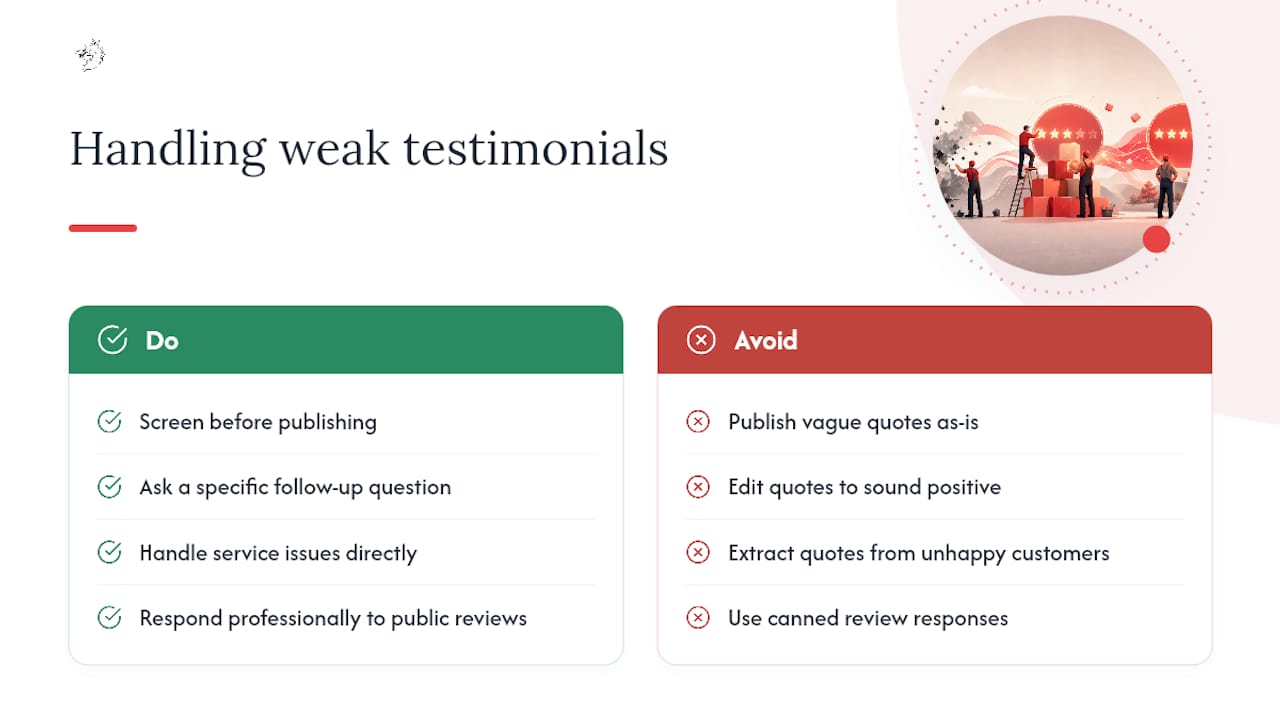
Not every customer story is usable, and pushing a weak one live does more harm than skipping it. A testimonial that's vague ("good job, thanks") adds nothing. One that's lukewarm or backhanded ("took longer than expected but the result was fine") can quietly plant doubt in a prospect's mind.
Screen before you publish. If a testimonial reads flat, go back with a specific follow-up question rather than using it as-is: "What was the moment you felt most confident in the decision?" Often a second, better answer comes out of a customer who just needed a sharper prompt.
If a customer's experience genuinely wasn't great, don't try to spin it into a testimonial. Handle the service issue directly and separately. Trying to extract a quote from an unhappy customer, or editing a lukewarm one to sound more positive, crosses into misleading territory and erodes the trust testimonials are supposed to build in the first place.
For reviews that land on public platforms rather than your own collection process, respond professionally and specifically rather than with a canned line. A thoughtful public response to a mixed review often reassures future prospects more than a wall of five-star quotes with no context at all. Treat a weak testimonial as a signal to improve your ask process, not a problem to hide.
Legal Considerations Beyond FTC: Privacy and Defamation Risks
FTC disclosure rules aren't the only legal line to watch. Privacy and defamation exposure show up in two directions, and both deserve attention before you hit publish.
On the privacy side, using a customer's name, face, or home address without clear consent can create liability even if the testimonial itself is glowing. This matters more in states with stricter privacy statutes, so when in doubt, get consent in writing rather than relying on a verbal "sure, go ahead" you can't produce later. Blur or crop identifying details like house numbers in photos if the customer didn't explicitly approve showing them.
On the defamation side, the risk usually runs the other direction: a competitor or disgruntled former employee posting a fabricated negative review about your business. You generally can't publish a fake positive testimonial to counter it, that's its own legal and platform-policy problem, but you can document the fake review and report it through the platform's dispute process.
If your business operates under a contractor's license, some states also have advertising rules governing what claims a licensed contractor can make in marketing materials, testimonials included. A quick check with your state licensing board or a local business attorney costs less than untangling a complaint after the fact.
Why Testimonials Are the Most Underused Local SEO Asset in Home Services
Most contractors treat testimonials as decoration for the homepage. That's a mistake. Testimonial text carries service names, city names, and specific project details, exactly the language local search algorithms and AI answer engines look for when matching a searcher's intent to a business.
At Vaultio, we structure testimonial metadata into service pages and project galleries so it strengthens both traditional rankings and AI-generated recommendations. Paired with fast lead response, testimonial-driven pages tend to convert a higher share of visitors into booked estimates rather than lost inquiries.
— Damian
Let Vaultio Build the System, Not Just the Testimonials
Collecting great testimonials is only half the job. If they're sitting on a page nobody finds, or a lead fills out your form and waits three hours for a callback, you're still losing jobs to whoever responds first. Vaultio bundles testimonial capture into a full local ranking and lead-response system, so the proof you collect actually gets seen by the right customer at the right moment.

That means testimonial metadata built into conversion-optimized service pages, local SEO tuned to surface your best reviews in Google and AI search results, and an AI receptionist that engages every new lead within seconds instead of hours. Contractors who pair strong testimonials with this kind of fast, automated response typically see more of their estimates turn into signed jobs.
If you're ready to see what a testimonial-backed, AI-powered lead system looks like for your business, schedule a consultation with Vaultio and get a breakdown of what it would take to own your local search results.
Sources
- —Contractor Testimonial Request Template: Ask Better, Use More | ProTradeHQ
- —Customer testimonials that win contracting jobs | GuildQuality
- —Get more high-quality remodeling reviews & testimonials | SiteMancer
- —Silvermine
Recommended
Ready to Implement This?
We'll build your complete lead generation system in 72 hours. No contracts. 30-day money-back guarantee.