Contractors: Fix GBP, Publish Your Top 3 Service Area SEO Pages

# Contractors: Fix GBP, Publish Your Top 3 Service Area SEO Pages
Configure your Google Business Profile service areas correctly, then build a small set of high-quality service-area pages backed by real local reviews. That's the entire game. Skip the address games, skip the mass-produced city pages, and you'll unlock more local calls and bookings from towns you already serve but currently rank invisible in.
*
TL;DR: - Properly set your Google Business Profile service areas to cover only towns with actual revenue potential within a two-hour drive radius to avoid suspension or reduced relevance. - Build service area pages only for towns with proven local proof, measurable search volume, and revenue, avoiding thin, duplicate doorway pages that may incur penalties. - Use schema markup, maps, and local-specific HTML content to verify your actual service coverage and prevent Google from viewing your claims as unverified noise. - Collect geo-tagged reviews, publish localized proof images, and ensure consistent NAP information across directories to boost local trust and relevance. - Track local rankings, search queries, and conversions over 60 to 90 days to measure the effectiveness of your SAP and GBP updates before expanding to additional towns.
*
Table of Contents
- —What Is Service Area Business SEO and Why GBP Setup Comes First
- —Service Area Pages: When to Build Them and How to Avoid Doorway Pages
- —Technical Signals That Prove You Serve an Area
- —How to Prove You Actually Work in Every City You List
- —Measuring Whether Your SAP and GBP Changes Are Working
- —Where a Done-for-You Local SEO Workflow Fits
- —What To Fix in Month One
- —An Honest Option If You'd Rather Not Do This Yourself
- —Sources
What Is Service Area Business SEO and Why GBP Setup Comes First
Service area business SEO is the practice of ranking your home service company in Google's local results across every town you drive to, without a public storefront in each one. Google calls this a Service Area Business (SAB), and it plays by different rules than a business with a walk-in location. Get those rules wrong, and Google either suspends your profile or buries it under competitors who bothered to read the fine print.
Here's how to set it up correctly.
Open your Google Business Profile, go to Edit Profile → Location → Service Area, and add the cities, ZIP codes, or counties you actually service. That's the exact path Google documents, and skipping steps here is where most contractors get tripped up.
- —Hide your address if you don't see customers there. Google's own guidance on managing service areas is explicit: if customers never visit your business address, that address needs to stay hidden. Showing it anyway when you're not storefront-based is a fast track to a suspension.
- —You can set service areas for up to the number allowed by Google's guidelines. Use them on the towns that actually generate revenue, not every ZIP code within shouting distance.
- —Stick to roughly a two-hour drive radius. Google's own benchmark for legitimate service areas caps out around two hours from your base. Beyond that, your relevance signal collapses.
- —Choose your primary and secondary categories carefully to accurately represent your services. "Plumber" beats "Contractor" every time for a plumbing company.
- —Fill out every field. Hours, services, attributes, business description. An incomplete profile signals low trust to Google's ranking systems.
- —Post photos regularly and respond promptly to reviews to maintain an active profile. Profiles with fresh activity outperform static ones in the local pack.
Common mistakes that quietly kill visibility: using a virtual office or UPS box as your listed address, setting your service radius to cover territory you can't realistically staff, and choosing a generic category because it "sounds bigger." Fix these first. Everything else in this guide depends on a clean, compliant profile underneath it.
Service Area Pages: When to Build Them and How to Avoid Doorway Pages
Not every town you service deserves its own page. Build one only when three things line up: the city generates real revenue potential, you have actual proof of work there (before-and-after photos, a testimonial, a completed job), and there's measurable search volume for your service plus that city name. Skip any two of the three, and you're building a page nobody will ever find or trust.
Search Engine Land's guidance on service area pages makes a point worth repeating: a well-built SAP can outrank massive directory sites for city-specific searches, because directories can't show local proof and yours can.
Here's the template that works:
- 1.A headline naming the city and the service ("Emergency Water Heater Repair in Thousand Oaks").
- 2.A section on the local problem you solve — hard water in one town, older pipe systems in another, whatever is specific to that area.
- 3.Local proof: real job photos, a customer quote from that neighborhood, a completed project story.
- 4.A clear list of services offered in that town.
- 5.A specific call to action with a local phone number or a booking link, not a generic "Contact Us."
For URLs, put the city and service together (`/thousand-oaks/water-heater-repair`), and keep title tags in the 50 to 60 character range Google typically displays in full. Link every SAP from a central "cities we serve" index so nothing sits orphaned.
Pro Tip: If you don't have proof of work in a smaller town, don't force a page for it. Group two or three nearby communities into one strong page instead of three thin ones — industry guidance backs grouping over padding every time.
Doorway pages are the trap here: dozens of near-identical pages that swap out one city name and change nothing else. Google's Helpful Content systems catch this pattern fast, and the penalty hits your entire domain, not just the offending pages. Start with your top three to five cities by revenue, prove those pages work, then expand.
Technical Signals That Prove You Serve an Area
Search engines need machine-readable proof that you actually cover the territory you're claiming, not just prose saying so.
- —Add LocalBusiness or Service schema with `areaServed` markup naming every city or region you cover. A `GeoShape` or radius property reinforces the claim without exposing an address you're required to hide.
- —Embed a map or service-area visualization on your main site, using a polygon or radius overlay rather than a pin on your storefront (which you may not have).
- —Build an HTML sitemap or "cities we serve" index page linking to every SAP. BrightLocal's research on service area page structure is blunt about this: pages hidden behind a JavaScript-only store locator often never get crawled at all.
- —Never rely on a widget that renders city links client-side with no HTML fallback. If Googlebot can't see the link in the raw HTML, that page might as well not exist.
- —Fix mobile speed and layout before anything else. Mobile devices generate a dominant share of all website traffic, and a service-area page that loads slowly on a phone loses the call before the visitor even reads your headline.
None of this is optional flourish. It's the difference between Google trusting your coverage claims and treating your city pages as unverified noise.
How to Prove You Actually Work in Every City You List
Reviews and citations do the heavy lifting that a physical storefront would normally do. A plumber with three locations gets local trust automatically. A service-area plumber has to earn it, town by town.
- —Encourage customers to include the neighborhood or city in their reviews to increase local relevance. A simple ask like "Would you mind mentioning which part of town we worked in?" produces reviews that carry real local relevance, something Search Engine Journal's local SEO research flags as a direct signal booster.
- —Publish geo-tagged before-and-after photos on both your SAP and your GBP listing, tied to specific job sites (never share addresses of private homes without permission).
- —Keep your NAP (name, address, phone) identical across every directory you appear on: Yelp, Angi, industry-specific directories, chamber of commerce listings.
- —Pursue local backlinks through sponsorships, community event pages, and local press, not generic guest posts from unrelated sites.
Pro Tip: Track link and citation value with a simple spreadsheet: source, city targeted, date acquired, and whether call volume from that city moved afterward. Most contractors skip this and have no idea which outreach actually worked.
Measuring Whether Your SAP and GBP Changes Are Working
You can't improve what you don't track by city, and lumping all your traffic into one dashboard hides exactly the data you need.
- 1.Analyze Google Search Console data for impressions and queries mentioning your target cities. If "Thousand Oaks water heater repair" shows impressions but zero clicks, your page exists but your listing or meta description isn't earning the click.
- 2.Track phone clicks, direction requests, and booking conversions in GA4, tied to landing page, so you know which SAP or GBP interaction actually produced a lead.
- 3.Layer in call tracking so leads from a specific city page get attributed correctly instead of vanishing into a generic "phone call" bucket.
- 4.Check local pack and organic rank position weekly, city by city, not just for your homepage.
- 5.Give every meaningful change a 60 to 90 day window before judging it. Local rankings move slower than paid ads. If nothing has shifted by day 90, revisit the page's proof content and local backlink profile before assuming the whole strategy failed.
Where a Done-for-You Local SEO Workflow Fits
Every tactic above works. It also takes real hours: auditing GBP fields, writing unique proof-driven copy for each city, chasing down geo-tagged reviews, wiring up schema, and checking rank positions weekly across a dozen towns. That's the part most contractors underestimate until month two.
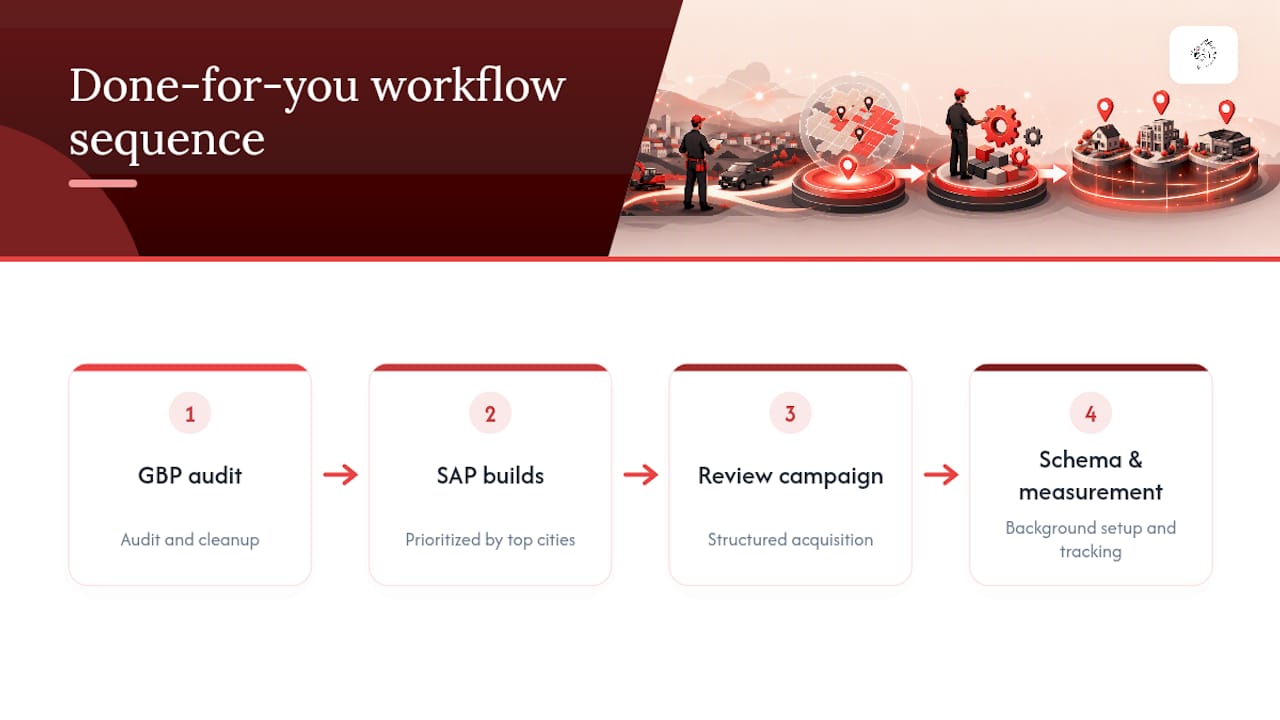
A done-for-you workflow takes the guide above and turns it into an operational sequence: GBP audit and cleanup first, then prioritized SAP builds for your top revenue cities, then a structured review campaign, then schema and measurement setup running in the background. Vaultio runs this exact sequence for contractors, paired with lead response fast enough to catch the calls the SEO work generates before a competitor does. The highest-impact, most time-consuming pieces, SAP writing and review acquisition, are exactly where outsourcing pays for itself fastest.
What To Fix in Month One
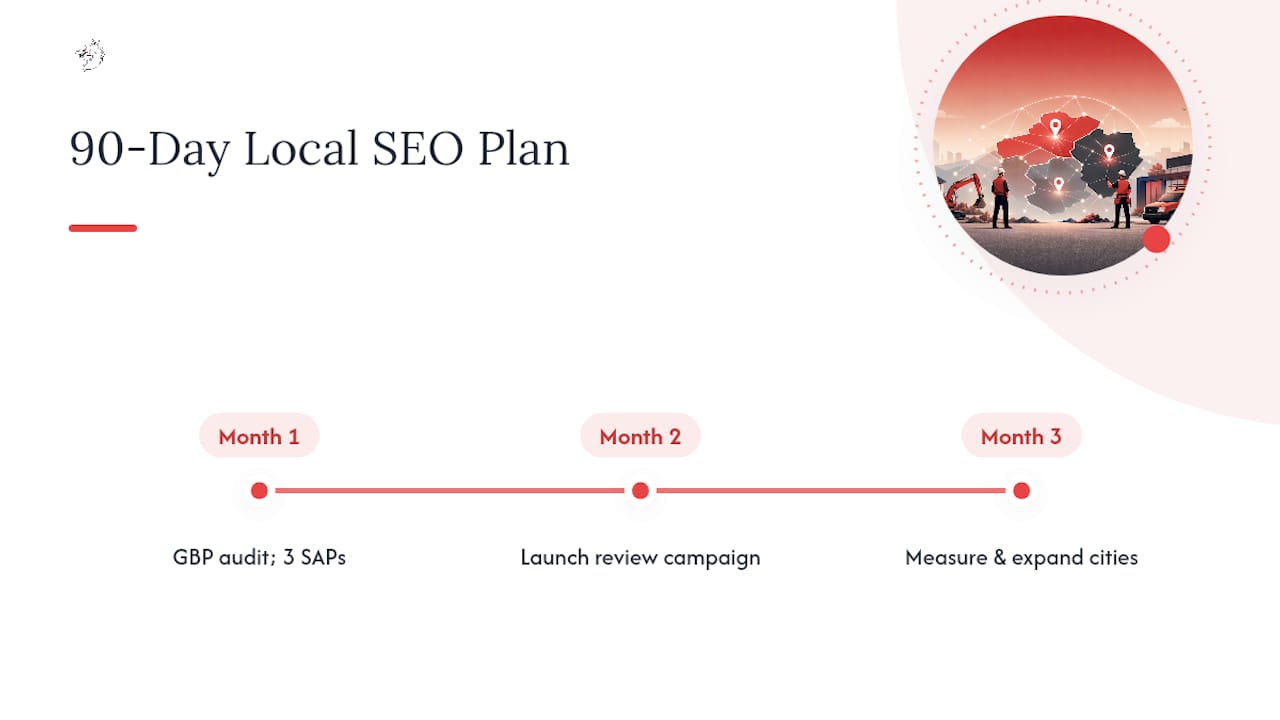
If you take one thing from this guide, prioritize in this order. First, audit and correct your GBP service areas and hidden-address setting. Second, publish your top three service-area pages with real local proof, not filler copy. Third, launch a review campaign asking customers to name their city or neighborhood.
Avoid the three mistakes that sink most contractors: templated city pages that swap one word per city, service radii that outstrip what you can realistically staff, and reviews clustered in one town while five others sit silent.
Rough checklist: days 1 to 30, GBP and top three SAPs. Days 30 to 60, review campaign and schema. Days 60 to 90, measure and expand to city four and five.
— Damian
An Honest Option If You'd Rather Not Do This Yourself
Everything in this guide is doable in-house. It's also a lot of ongoing work for an owner who's supposed to be running jobs, not writing schema markup at 9 PM. Vaultio is the alternative to hiring an in-house marketer or juggling three freelancers for a contractor who wants this handled end to end, correctly, the first time.

Vaultio's local SEO service covers the full sequence from this guide: GBP audit and correction, prioritized service-area page builds with real local proof, structured review campaigns targeted by city, schema and technical setup, and AI-powered lead response that engages new inquiries within seconds instead of hours. Clients often experience an increase in booked jobs per month after implementation, supported by a satisfaction guarantee period. If you're in the Central Coast or Ventura County area, start with a look at the San Luis Obispo SEO page or see which contractor trades Vaultio works with to get a sense of fit before booking a call.
Sources
- —Manage your service areas for service-area & hybrid businesses - Google Business Profile Help
- —Service Area Pages: Boost Local SEO Across Locations - Search Engine Land
- —How to Do Service Area Page SEO for Local Search Visibility - BrightLocal
Recommended
Ready to Implement This?
We'll build your complete lead generation system in 72 hours. No contracts. 30-day money-back guarantee.