Cut No Shows 30 to 50% in 90 Days: Booking Playbook for Clinics
# Cut No Shows 30 to 50% in 90 Days: Booking Playbook for Clinics
Cut no-shows by fixing the booking pathway first, then layering reminders on top of it. Online self-scheduling with frictionless rescheduling, multi-touch confirm-or-reschedule reminders, risk-based outreach for your highest-risk patients, and an automated waitlist to backfill open slots. Together, these four levers routinely cut no-show rates by 30 to 50 percent within 90 days. The rollout checklist below shows exactly how to sequence them.
*
TL;DR: - Online self-scheduling significantly reduces no-show rates to around 1.8%, compared to 5.9% for phone bookings, especially when systems sync perfectly with your EHR. - Multi-touch reminders via SMS and email, with confirm-or-reschedule prompts, can cut no-shows by up to 50% within three days of the appointment. - Risk-based outreach, including live calls for high-risk patients, can lower no-shows by approximately 40%, leveraging data like previous no-shows and booking lead times. - Automated waitlists and calibrated overbooking based on your local no-show rate can recover up to 50% of lost revenue from missed appointments.
*
Table of Contents
- —Quick Prioritized Checklist: 8 Proven Tactics to Reduce No Shows
- —Why Online Self-Scheduling Cuts No-Shows Structurally
- —How Often Should You Send Appointment Reminders?
- —Which Patients Need High-Touch Outreach Instead of a Text?
- —Turning Empty Slots Into Recovered Revenue
- —Pre-Visit Instructions and Access Barriers That Cause Cancellations
- —How Do You Calculate the Real Cost of a No-Show?
- —A 30 to 60 Day Rollout Plan for Cutting No-Shows
- —Do Incentives and Penalties Actually Change Patient Behavior?
- —Why Patient Education Changes Attendance More Than People Expect
- —What's the Best Way to Handle a Last-Minute Cancellation?
- —Author Perspective: What Actually Moves the Needle on the Floor
- —A Faster Path to Fewer No-Shows: Automated Booking and Instant Response
- —Authoritative Studies and Case Reports Cited
- —Sources
- —FAQ
Quick Prioritized Checklist: 8 Proven Tactics to Reduce No Shows
Not every fix deserves the same slice of your budget or your staff's attention this quarter. Some tactics move the needle in weeks. Others take months to configure and only pay off at scale. Here is the priority order, ranked by expected impact against the effort it takes to stand each one up.
- 1.Online self-scheduling and one-tap rescheduling. Structural no-show rates drop to 1.8% versus 5.9% for phone-only booking. Effort: medium. Impact: high.
- 2.Multi-touch, multi-channel reminders. A three-day, one-day, and same-day cadence across SMS and email catches patients who ignore a single text. Effort: low. Impact: high.
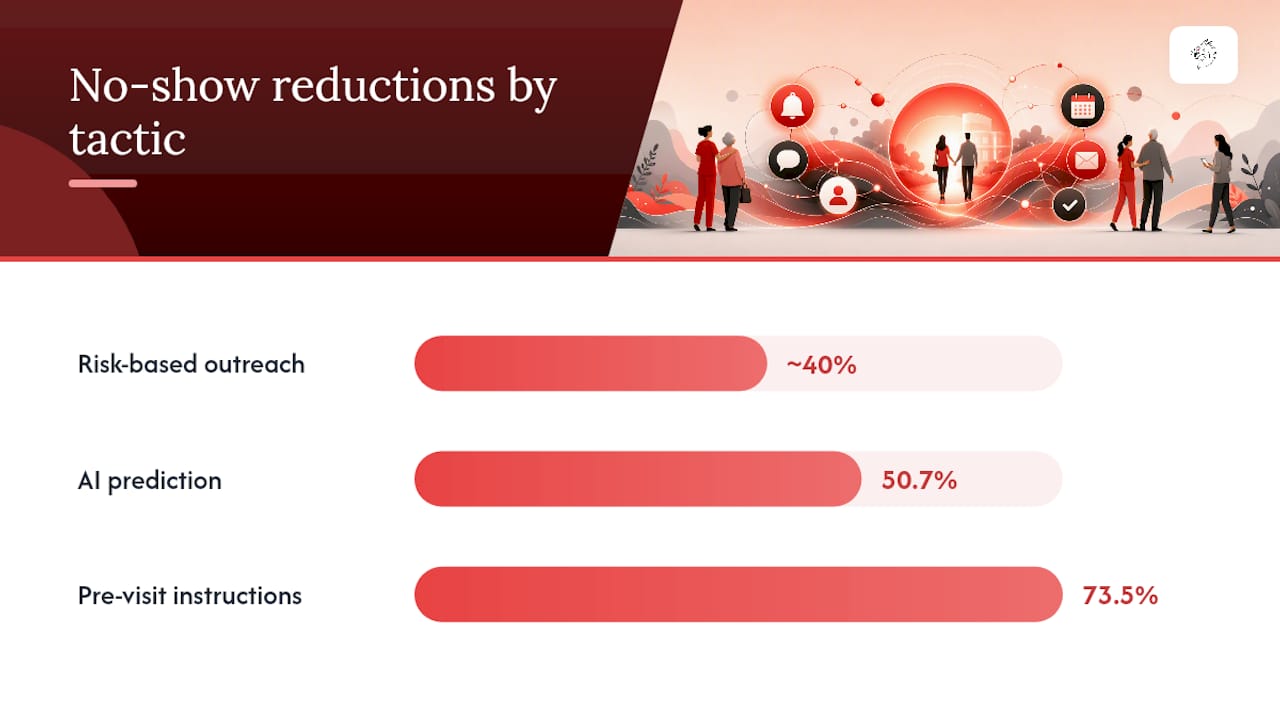
- 3.Risk-based outreach for repeat no-show patients. Live calls for your highest-risk segment can cut no-show probability by roughly 40%, based on outreach studies discussed later in this guide. Effort: medium. Impact: high.
- 4.Automated waitlist and backfill. Freed slots get offered to waiting patients within minutes instead of sitting empty for days. Effort: low. Impact: medium to high.
- 5.AI-powered no-show prediction with a live dashboard. One before-and-after study recorded a 50.7% reduction in no-shows after deploying a prediction model tied to real-time staff alerts. Effort: high. Impact: high.
- 6.Interactive pre-visit instructions for procedures. Bilingual, interactive texting before procedural visits cut late cancellations by 73.5%. Effort: low. Impact: high for procedural specialties.
- 7.Deliberate overbooking calibrated to your local no-show rate. A blunt tool, but a useful one once you know your actual numbers. Effort: low. Impact: medium.
- 8.Patient incentives and clear cancellation policies. Slower to show results but useful for shifting long-term behavior. Effort: low. Impact: low to medium.
If you do nothing else this quarter, pilot tactics one and two together for 30 to 60 days on a single department or provider panel. They require the least technical lift, touch every patient, and give you a clean baseline to measure everything else against.
Pro Tip: Don't pilot more than two tactics at once. If no-shows drop, you won't know which change caused it, and you'll waste the next quarter arguing about which one to scale.
Why Online Self-Scheduling Cuts No-Shows Structurally
The gap is not small. Practices running comprehensive online self-scheduling report no-show rates around 1.8%, compared with 5.9% for phone-booked appointments. That's not a marginal edge. It's a structural shift in who books what, and when.
Four mechanisms explain the gap. Patients booking online choose real-time availability that fits their actual schedule, rather than accepting whatever slot a receptionist offers over the phone. Bookings tend to land closer to the actual need, so patients are less likely to forget why they scheduled in the first place. Systems that capture a card on file at booking see fewer casual no-shows, because there's a real cost attached to skipping. And self-scheduling flows often force intake completion upfront, which filters out patients who were never seriously committed to the visit.
The catch: half-measures don't work. A booking widget bolted onto a static webpage that doesn't sync with your actual EHR calendar creates double-bookings and staff workarounds, which erodes trust in the system fast. Full rollout matters more than partial rollout.
A working implementation checklist looks like this:
- —Confirm real-time, two-way sync between your booking tool and your EHR or practice management system before launch.
- —Map your actual scheduling rules (provider availability, visit-type duration, new-patient buffers) into the booking logic exactly, not approximately.
- —Decide your card-on-file policy up front and disclose it clearly at the booking step.
- —Test the full patient path end to end, including rescheduling and cancellation, before opening it to real patients.
- —Run a 30-day soft launch with one provider panel before expanding practice-wide.
The most common pitfall is treating self-scheduling as a marketing feature instead of an operations change. If the scheduling rules in the tool don't match what your front desk actually does, patients will book appointments the system can't honor, and staff will spend hours untangling it by phone anyway. That defeats the entire point of decreasing booking drop-off in the first place.
Pro Tip: Test rescheduling before you test booking. A frictionless "change this appointment" flow prevents more no-shows than a frictionless "book this appointment" flow, because it catches patients before they simply skip.
How Often Should You Send Appointment Reminders?
A three-touch cadence outperforms a single reminder: one message three days out, one the day before, and one the morning of the visit. Spacing them this way catches patients at different decision points, whether they're planning their week or double-checking their morning schedule.
Channel order matters as much as timing. SMS should carry the primary load because open rates dwarf email, and most patients read a text within minutes. Email works as a secondary touch, useful for carrying more detail like prep instructions or forms. Reserve voice calls for patients who haven't responded to two prior digital touches, or for higher-risk visit types where a live conversation catches hesitation a text can't.
The reminder itself needs a job to do beyond notifying. A message that only informs gets ignored; a message that asks for action gets a response. Build every reminder around a two-way confirm-or-reschedule prompt, something like "Reply C to confirm or R to reschedule," and route those replies into an automated workflow that updates the schedule without a staff member touching it.
A few design details separate reminders that work from reminders that get deleted:
- —Send bilingual messages by default in any market with a meaningful non-English-speaking patient population, not as an afterthought add-on.
- —For procedural or prep-heavy visits, make the reminder interactive rather than static, prompting patients to confirm they've read prep instructions.
- —Track response rate (percentage who reply at all) and rebook rate (percentage who reschedule instead of silently no-showing) separately. They tell you different things.
- —Retire any reminder template that gets under a 20% response rate. It's not reaching patients the way you think it is.
Response rate and rebook rate together tell you whether your reminders are actually preventing no-shows or just generating noise. A high response rate with a low rebook rate means patients are confirming but still not showing up, which usually points to a deeper access barrier, not a messaging problem.
Which Patients Need High-Touch Outreach Instead of a Text?
Not every patient carries the same no-show risk, and treating them identically wastes your highest-touch resources on people who never needed them. A simple three-tier model, built from four data points you likely already have in your EHR, gets you most of the way there.
The predictors worth tracking: history of prior no-shows (the single strongest signal), lead time between booking and the visit (longer lead times carry more risk), whether it's a first visit with a new provider, and appointment type (procedures and specialty referrals no-show at different rates than routine follow-ups).
From there, match outreach intensity to risk instead of blasting everyone the same way:
- —Low risk (no prior no-shows, short lead time): automated SMS reminders only, no staff time required.
- —Medium risk (one prior no-show or a longer lead time): two-way SMS with a required confirm-or-reschedule reply.
- —High risk (two or more prior no-shows, long lead time, or a first visit): a live call from a scheduler or patient navigator, ideally within 48 hours of booking.
Segmented outreach consistently beats broadcast-style reminders sent identically to every patient. Reserving live calls for your highest-risk group, rather than spreading that staff time thin across everyone, is what makes the model efficient rather than just labor-intensive.
Live outreach for high-risk patients can meaningfully lower no-show probability, and the AI-driven prediction and dashboard model in one before-and-after study drove a 50.7% reduction in no-show rates, alongside a 5.7-minute drop in patient wait time as a secondary benefit. That figure came from a specific clinical setting, so treat it as a strong directional signal rather than a guaranteed number for your panel; validate it against your own data before promising results to leadership.
Pro Tip: Start your risk model with just one variable: prior no-show count. It's the easiest field to pull from most EHRs and, on its own, predicts more than people expect. Add lead time and visit type once the basic model is running.
Turning Empty Slots Into Recovered Revenue
A no-show doesn't have to mean an empty slot. It means a slot someone else could have filled, if you move fast enough. Automated waitlists and calculated overbooking exist to make sure that slot doesn't sit unused.
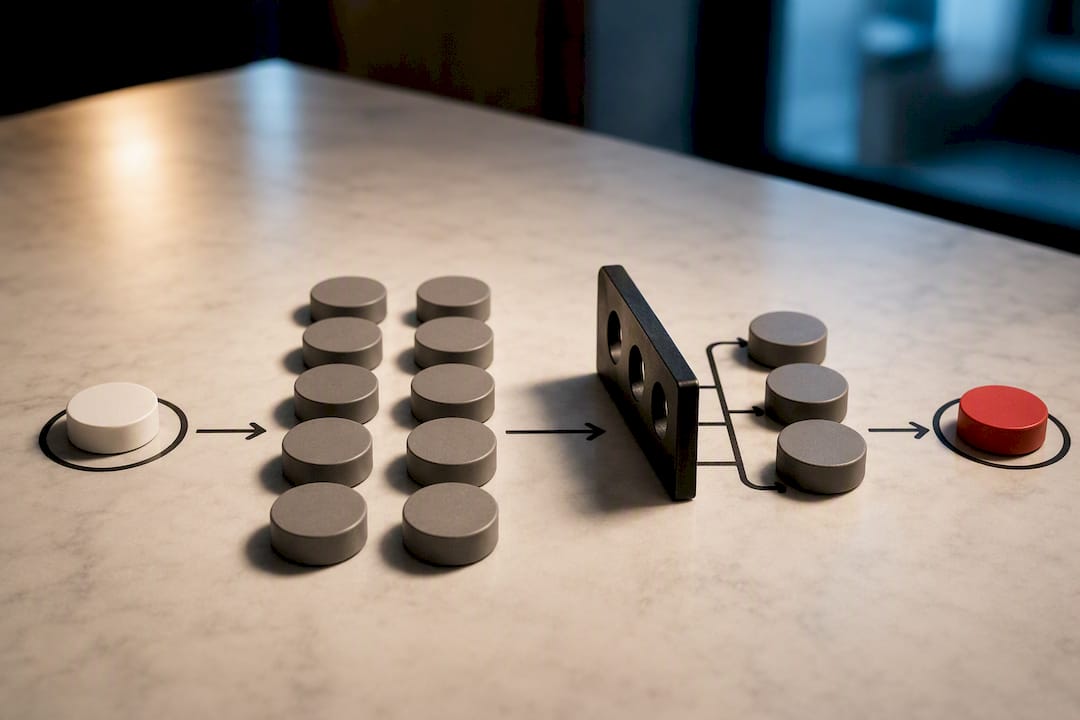
The mechanics work better automated than manual. A traditional call-down list means a scheduler working the phones one patient at a time, hoping someone answers before the appointment window closes. An automated waitlist instead pushes a text to a prioritized list of waiting patients the moment a cancellation posts, and the first to confirm gets the slot. That turnaround can happen in minutes instead of hours.
A workable backfill system needs three things in place:
- 1.Clear eligibility rules for who goes on the waitlist, based on visit type compatibility so a physical-therapy slot doesn't get offered to someone waiting for a wellness check.
- 2.Real-time sync with your EHR so a filled slot from the waitlist updates the schedule instantly and doesn't get double-booked five minutes later by a walk-in.
- 3.A simple overbooking formula calibrated to your actual local no-show rate, not a generic industry guess. If your no-show rate for a given provider or clinic sits around 10%, overbooking a small, fixed number of slots per day recovers most of that lost capacity without creating routine overcrowding.
Overbooking without local data is guesswork with a schedule attached. Pull your own historical no-show rate by provider and appointment type before setting any overbooking rule, and recheck it quarterly since rates shift with season and payer mix.
Refundable deposits or modest no-show fees make sense for high-value procedural slots or chronic high-risk no-show patients, but they're a blunt instrument for a first-time no-show. Reserve financial penalties for repeat behavior, not a single missed visit.
Pre-Visit Instructions and Access Barriers That Cause Cancellations
Procedural visits carry a specific failure mode: patients cancel late not because they forgot, but because they weren't sure they'd prepared correctly. One case study built around interactive, bilingual pre-procedural text confirmations found it cut late cancellations by 73.5% and no-shows by 73.1%, with a meaningful cost-avoidance impact for the department involved.
The design that made it work wasn't a static instruction sheet. It was interactive: patients received prep steps by text and had to confirm they understood before the system marked them ready. That single confirmation step catches confusion early enough to fix it, instead of finding out at check-in that a patient skipped a required fasting window or missed a required document.
Build this into your existing reminder flow rather than as a separate system:
- —Trigger interactive prep instructions automatically at the same time as your three-day reminder for any procedural or prep-heavy visit.
- —Require a confirmation reply before the visit counts as fully prepped in your system.
- —Offer instructions in the patient's preferred language by default, particularly for practices in areas with a substantial non-English-speaking population.
- —Flag any unconfirmed prep instruction for a follow-up call, not a second automated text.
Access barriers deserve equal weight next to communication gaps. Transportation is one of the most underdiagnosed no-show causes in outpatient care, particularly for older patients and those managing chronic conditions with frequent visits. A quick intake question, "Do you have reliable transportation to this visit?", flagged at booking gives staff a chance to offer a telehealth alternative before the appointment date rather than losing the visit entirely. For any visit that doesn't require hands-on examination, offering a virtual option removes the access barrier instead of trying to work around it after the fact.
How Do You Calculate the Real Cost of a No-Show?
A no-show rate on its own doesn't tell leadership anything they can act on. Turning it into a dollar figure does. Start with the basic formula: no-show rate equals missed appointments divided by total scheduled appointments, multiplied by 100.
From there, cost per missed appointment is the average revenue per visit (net of typical payer reimbursement) multiplied by your no-show count over a given period. A clinic running 40 no-shows a month at an average net visit value of $150 is losing roughly $6,000 monthly, or about $72,000 annualized, before accounting for staff idle time or provider underutilization.
| Metric | Formula | What it tells you |
|---|---|---|
| No-show rate | Missed visits / total scheduled × 100 | Baseline problem size |
| Fill rate | Slots refilled / slots vacated × 100 | Waitlist and backfill effectiveness |
| Recovered-slot rate | Revenue from refilled slots / total lost revenue × 100 | How much of the loss you're actually clawing back |
| Cost per no-show | Average net visit value × no-show count | Dollar impact for leadership reporting |
Run any new tactic as a controlled comparison, not a blanket rollout. Pick one provider panel or department as your test group, hold a similar panel as a comparison group, and measure over a minimum 60-day window since shorter windows get skewed by seasonal booking patterns. Track the same four metrics before and after so the improvement is provable, not anecdotal.
For a leadership dashboard, four numbers cover it: current no-show rate against your baseline, fill rate on cancellations, dollar recovery from backfilled slots, and rebook rate from reminder campaigns. That's enough to prove whether a change worked without burying anyone in noise.
A 30 to 60 Day Rollout Plan for Cutting No-Shows
Sequencing matters more than intensity. Rolling out five changes simultaneously across every department guarantees you'll never know which one worked, and it burns staff patience fast.
- 1.Days 1 to 5: Pick your pilot. Choose one department or provider panel with a moderate no-show rate, enough volume to generate meaningful data, but not your highest-stakes specialty.
- 2.Days 6 to 15: Configure the two highest-leverage tactics. Set up online self-scheduling sync and build your three-touch reminder cadence in parallel.
- 3.Days 16 to 20: Train front-desk and scheduling staff. Give them a simple script: "We're testing a new reminder system. If a patient calls confused about a text, here's what to say."
- 4.Days 21 to 45: Run the pilot live. Track no-show rate, fill rate, and response rate weekly, not just at the end.
- 5.Days 46 to 55: Compare against baseline. A no-show rate drop of 15% or more against your pre-pilot baseline is a strong signal to expand.
- 6.Days 56 to 60: Decide and scale. If the pilot hits your acceptance threshold, expand to a second department; if not, isolate which piece underperformed before touching anything else.
Pro Tip: Write the escalation path before launch, not during it. Decide now who handles a patient who's confused by an automated text, so front-desk staff aren't improvising an answer on a Tuesday morning.
Do Incentives and Penalties Actually Change Patient Behavior?
Financial policies work best as a backstop, not a first response. A no-show fee applied to a first-time offender who missed a visit due to a transportation problem does nothing but damage trust in your practice. Reserve penalties for a documented pattern, typically two or more no-shows within a defined window, and disclose the policy clearly at intake so it never arrives as a surprise.
Incentives tend to work better for shifting long-term behavior than penalties do for one-off enforcement. Some practices offer small account credits for a streak of kept appointments, or waive a co-pay processing fee for patients who confirm through the portal rather than by phone. These cost little to run and reward the behavior you actually want, rather than punishing the behavior you don't.
The policy that backfires most often is a blanket fee applied uniformly regardless of appointment type or patient history. It reads as punitive rather than fair, and patients who feel penalized unfairly are more likely to switch practices entirely than to start showing up more reliably. Pair any penalty policy with a clear appeal or waiver process for documented hardship, transportation issues, or a genuine emergency. A policy without flexibility just pushes patients toward competitors instead of toward better attendance.
Whatever policy you choose, put it in writing, communicate it at scheduling and again in the reminder sequence, and apply it consistently across every provider. Inconsistent enforcement is worse than no policy at all, because it feels arbitrary to patients who get flagged.
Why Patient Education Changes Attendance More Than People Expect
Patients who understand why a visit matters show up more reliably than patients who were just told to show up. That distinction shows up constantly in procedural and chronic-care settings, where a missed follow-up carries a real clinical consequence the patient may not fully grasp.
Education works best woven into the messages patients already receive, not as a separate campaign.
Chronic-disease management visits benefit especially from this framing. A patient managing diabetes or hypertension who understands that a missed check-in delays a medication adjustment is more likely to prioritize that visit over a scheduling conflict. Framing the appointment around the patient's own outcome, not the clinic's calendar, changes how they weigh it against competing demands on their day.
Keep the education specific to the visit type rather than generic. A routine annual physical needs a different message than a post-surgical follow-up. Build a short library of visit-specific reminder templates that state, in plain language, what happens if the visit gets skipped, and let your reminder system select the right one automatically based on appointment type.
What's the Best Way to Handle a Last-Minute Cancellation?
A cancellation with less than 24 hours' notice is a different problem than a routine no-show, and it needs a faster response than your standard reminder cadence provides. The gap between "patient cancels" and "slot gets filled" needs to close in minutes, not hours.
This is where your automated waitlist earns its keep. The moment a late cancellation posts, push a text to your prioritized waitlist immediately rather than waiting for a scheduler to notice the opening. For same-day cancellations specifically, consider a shorter response window, offering the slot to the first three waitlisted patients simultaneously rather than one at a time, since a sequential call-down burns the exact minutes you don't have.
For patients who repeatedly cancel at the last minute rather than no-showing outright, treat the pattern the same way you'd treat repeat no-shows: flag them into your high-risk outreach tier and add a live confirmation call 48 hours out rather than relying on automated texts alone. The behavior pattern matters more than the technical distinction between a cancellation and a no-show.
Author Perspective: What Actually Moves the Needle on the Floor
Most clinics I've seen approach this backwards. They chase reminder templates first because they're cheap and easy to demo, then wonder why no-show rates barely budge. Reminders help, but they're a patch on a booking process that's often the real source of the leak. Fix how appointments get booked and rescheduled before you obsess over what the reminder text says.
Staff pushback is predictable and usually falls into two camps: "patients won't use a portal" and "we don't have time to configure another system." Both objections soften fast once you show them their own no-show numbers by appointment type. Front-desk staff who spend hours a week on phone call-downs are often the fastest converts to an automated waitlist, because it removes work they never enjoyed doing.
What disappoints people most is expecting overnight results from a partial rollout. A booking widget that doesn't sync with the real schedule, or a reminder cadence with only one touch, will underperform and get blamed on the strategy instead of the execution. Full commitment to two tactics beats a half-hearted attempt at five.
— Damian
A Faster Path to Fewer No-Shows: Automated Booking and Instant Response
Everything in this guide works. It also takes staff time, EHR configuration, and weeks of testing to get right, and that's the honest tradeoff of building it in-house. Vaultio's AI Chatbot & Scheduling tool handles the self-scheduling, confirm-or-reschedule flow, and automated waitlist backfill covered above as one connected system, built specifically for home service and appointment-driven businesses that can't afford a slow rollout.

Pair it with the AI Receptionist for 24/7 call answering, so a cancellation at 9 p.m. gets a response before the slot goes cold overnight instead of sitting unattended until morning. For practices that want a single team handling scheduling automation alongside lead follow-up and booking capture end to end, the done-for-you services package covers the full setup instead of asking your staff to configure it piece by piece.
If your team is already stretched thin on the tactics above, request a walkthrough of the AI Chatbot & Scheduling setup and see which of your current booking gaps it closes first.
Authoritative Studies and Case Reports Cited
The tactics in this guide draw on published clinical and operational research, not general industry advice:
- —Real-Time Analytics and AI for Managing No-Show Appointments in Primary Health Care — before-and-after study on AI-powered no-show prediction and dashboard alerts.
- —How Online Self-Scheduling Reduces No-Shows: A 7-Step Rollout Plan — comparison of online versus phone-booked no-show rates.
- —Interactive Text Confirmations With Pre-Procedural Instructions — case study on bilingual, interactive pre-visit messaging.
- —Impact of Online Appointment Scheduling on No-Show Rate — retrospective study across practice and hospital settings.
- —Marketing Automation Checklist for SMBs — practical framework for automating reminders and follow-ups at small-practice scale.
Sources
- —Real-Time Analytics and AI for Managing No-Show Appointments in Primary Health Care: Before-and-After Study (JMIR Formative Research, 2025)
- —How online self-scheduling reduces no-shows in 2026: A 7-step rollout plan (NextPatient / PMC summary)
- —Interactive text confirmations with pre-procedural instructions (case study summary reported in JMIR / JNM, 2025)
- —Impact of online appointment scheduling on no-show rate (Frontiers in Digital Health, 2025)
FAQ
What Is the Best Process to Reduce No-Shows?
Start with online self-scheduling and a multi-touch reminder cadence, since these address the largest share of preventable no-shows before adding risk-based outreach. Layer in an automated waitlist to backfill any slots you still lose, and measure your no-show rate weekly against a clear baseline.
How Can I Reduce the Number of No-Show Appointments?
Combine frictionless online booking, a three-touch SMS-first reminder cadence, and targeted live outreach for your highest-risk patients. Full online self-scheduling rollouts report no-show rates as low as 1.8%, versus 5.9% for phone booking, and typically cut no-shows by 30 to 50% within 90 days.
What's the Professional Way to Document a No-Show?
Most practices log a missed visit as "patient did not attend" or "no-show, no notice given" in the chart, distinct from a cancellation with advance notice. Keeping this distinction consistent in your records matters for accurate no-show rate calculations and for applying any penalty policy fairly.
What Is the Average No-Show Rate for Doctor Appointments?
No-show rates vary widely by booking method and specialty, but phone-booked appointments commonly run around 5.9%, while online-scheduled visits in the same settings run closer to 1.8%. Your own baseline, calculated from missed visits divided by total scheduled appointments, is the number that actually matters for your practice.
Can AI Tools Help Predict Which Patients Will No-Show?
Yes. One before-and-after study found an AI-powered prediction model tied to a real-time dashboard cut no-show rates by 50.7% while also reducing patient wait times. Tools like Vaultio's AI Chatbot & Scheduling apply similar automation to booking, reminders, and waitlist management without requiring a practice to build the system in-house.
Recommended
Ready to Implement This?
Your new site live within 8 days. No contracts. If your organic traffic doesn't grow within 90 days, we refund you in full.